
Guide
How to Use "Build Your Perfect AI Prompt" on Promzio — Complete Guide
Not sure how to write AI prompts that actually work? Promzio's free Prompt Builder lets you pick a Subject, Style, Lighting, and Mood — then hit "Enhance with AI" to get a professional-grade prompt in seconds. This guide walks you through exactly how it works, with 5 real examples built by hand on Promzio.

What Is the "Build Your Perfect AI Prompt" Section?
If you have ever opened an AI image generator and stared at a blank text box, not knowing where to begin — you are not alone. Writing a good AI prompt from scratch takes practice, knowledge of technical terms, and a clear creative vision. Most people spend more time thinking about the prompt than actually creating.
That is exactly the problem Promzio's Prompt Builder was built to solve.
Located at Build Your Perfect AI Prompt, the "Build Your Perfect AI Prompt" section is a free, interactive tool right on the Promzio homepage. You do not need to sign up, pay anything, or know any technical jargon. Just pick a few options, optionally describe your idea in your own words, and get a complete, ready-to-use AI prompt — in seconds.
How Does the Prompt Builder Work?
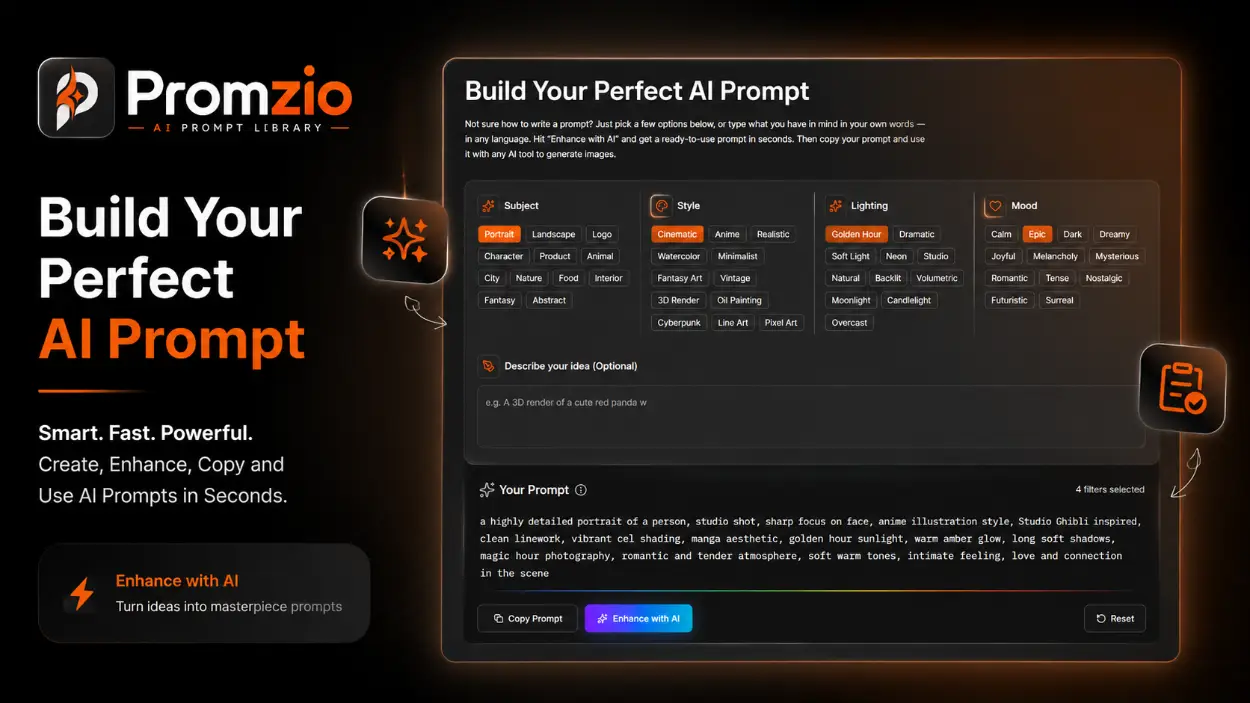
The Prompt Builder is divided into four smart categories, each with a set of clickable option pills. You can select one or more options from each category to build your prompt. Here is what each category covers:
1. Subject — What Are You Creating?
The Subject category tells the AI what the main focus of the image should be. Twelve options are available: Portrait, Landscape, Logo, Character, Product, Animal, City, Nature, Food, Interior, Fantasy, and Abstract. Each one maps to a precise set of descriptive keywords. For example, selecting Portrait adds "a highly detailed portrait of a person, studio shot, sharp focus on face" — and Fantasy adds "an epic fantasy scene with magical elements, dragons, castles, mystical creatures, dramatic scale."
2. Style — How Should It Look?
Style defines the visual language and artistic treatment. With 12 options — from Cinematic and Anime to Watercolor, Cyberpunk, Oil Painting, and Pixel Art — you shape the entire look of your output. Choosing Cinematic adds "cinematic film still, anamorphic lens, shallow depth of field, movie color grading, HBO quality." Choosing 3D Render adds "professional 3D render, Blender or Unreal Engine style, subsurface scattering, ray traced lighting."
3. Lighting — What Is the Atmosphere?
Lighting has an enormous impact on how an AI-generated image feels. The builder offers 11 lighting options: Golden Hour, Dramatic, Soft Light, Neon, Studio, Natural, Backlit, Volumetric, Moonlight, Candlelight, and Overcast. Each option injects precise lighting language into your prompt. Volumetric, for example, adds "volumetric god rays, light beams through fog or dust, atmospheric light scattering, cinematic depth." Golden Hour adds "golden hour sunlight, warm amber glow, long soft shadows, magic hour photography."
4. Mood — What Feeling Should It Have?
Mood is the emotional core of your image. Twelve options are available: Calm, Epic, Dark, Dreamy, Joyful, Melancholy, Mysterious, Romantic, Tense, Nostalgic, Futuristic, and Surreal. Selecting Epic adds "grand epic scale, awe-inspiring and powerful atmosphere, heroic mood, cinematic grandeur." Selecting Calm adds "serene and peaceful atmosphere, tranquil mood, soft colors, quiet contemplative feeling."
5. Describe Your Idea — Optional but Powerful
Below the category pills is a free-text description box. This is where you can type anything — your subject's appearance, a setting detail, a specific mood, clothing, props, or any nuance that does not fit a standard pill. The text box accepts input in any language, and the AI will weave it into the final prompt. This is what makes the builder personal rather than generic.
What Happens When You Click a Button?
At the bottom of the Prompt Builder, two buttons appear once you make your selections:
Copy Prompt — Copies the builder's output directly to your clipboard. The prompt is already formatted and ready to paste into Midjourney, DALL-E, Stable Diffusion, or any AI image tool you use.
Enhance with AI — This is where the real magic happens. Instead of using the raw pill-mapped keywords, the AI takes your entire input — filters plus description — and rewrites it into a richly detailed, professional prompt. It adds photography and rendering vocabulary, depth of field specifics, render engine mentions, color grading language, resolution tags, and stylistic flourishes that guide AI image generators toward far more precise and polished results.
The "Enhance with AI" option is what separates a good prompt from a great one — especially for complex scenes, character art, and cinematic compositions.
5 Real Prompts Built with the Prompt Builder
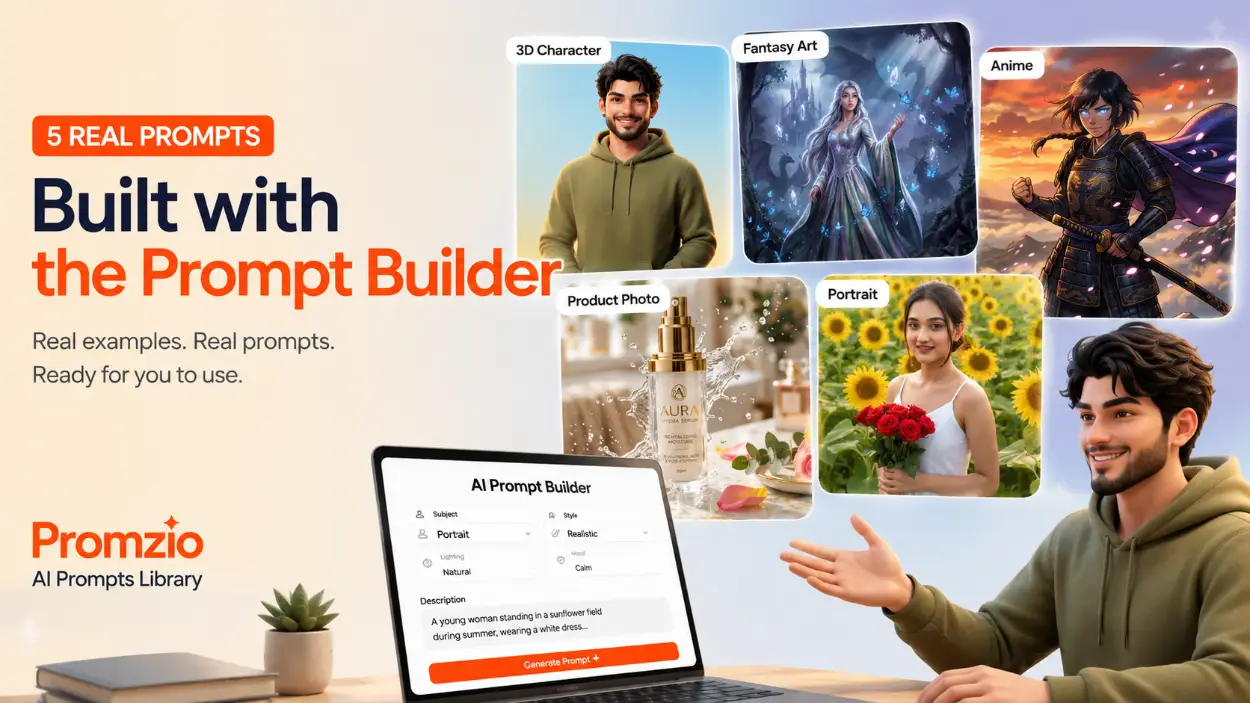
Every example below was created personally using the Prompt Builder tool. These are not hypothetical demonstrations — they are live prompts on Promzio that you can visit, copy, and use today.
Example 1 — Charismatic Young Man: Pixar-Style 3D Character Design
Filters selected: Subject: Character | Style: 3D Render | Lighting: Studio | Mood: Joyful
Description written: A charismatic young man with tousled brown hair and friendly hazel eyes, wearing an olive green hoodie and white sneakers.
"Enhance with AI" was used.
The enhanced prompt that came out:
A charismatic young man, early 20s, with slightly tousled brown hair and expressive, friendly hazel eyes, a genuine warm smile gracing his lips. He stands confidently in a full-body shot, hands casually tucked into the front pocket of a stylish, modern olive green hoodie, paired with pristine white sneakers and dark wash slim-fit jeans. His pose is relaxed yet engaging against a vibrant, softly gradient studio background, transitioning from sunny yellow to optimistic sky blue. This highly stylized Pixar-inspired 3D digital illustration, masterfully rendered as a premium character design, captures the soft, tactile texture of the hoodie's fleece and the clean surface of his sneakers. Soft, diffused three-point studio lighting with subtle rim lighting creates a cheerful atmosphere. Ray-traced global illumination enhances realistic subsurface skin scattering. Captured with a medium telephoto 85mm lens, showcasing a pleasing shallow depth of field with gentle background bokeh. The scene bursts with a vibrant, uplifting color palette of warm amber, golden tones, and cheerful blues, exuding an overwhelmingly positive and happy mood, ultra-detailed, 8K resolution, award-winning composition, hyper-sharp focus, professional color grading, masterpiece, rendered in Unreal Engine 5, octane render, trending on ArtStation.
Charismatic Young Man Pixar-Style 3D Character Design Illustration
Example 2 — Regal Fantasy Queen in a Mystical Forest with Glowing Butterflies
Filters selected: Subject: Fantasy | Style: Fantasy Art | Lighting: Volumetric | Mood: Epic
Description written: A regal young woman with long flowing silver hair in an iridescent silk gown, surrounded by luminous blue butterflies and floating crystals in an ancient forest at twilight, with an ethereal castle rising from the mist and dragons soaring in the sky.
"Enhance with AI" was used.
The enhanced prompt:
A regal young woman, embodying a fantasy queen, stands majestically amidst an ancient, mystical forest at twilight. Her long, flowing silver hair cascades over an opulent, iridescent silk gown, intricately embroidered and subtly glowing with arcane energy. She gazes outward with serene power, one hand gently raised, surrounded by a swarm of luminous blue butterflies and sparkling, translucent floating crystals. In the background, a grand, ethereal castle rises from volumetric mist, while the silhouettes of colossal dragons soar and other mythical creatures stir. The scene is captured as cinematic fantasy concept art, a highly detailed matte painting with painterly textures, bathed in an ethereal moonlit glow and dramatic god rays piercing through mystical fog, showcasing soft bioluminescent light from flora. A wide establishing shot, slightly low angle, captured with a 24mm anamorphic lens, features shallow depth of field and cinematic bokeh. The color palette features enchanting cool blues, deep purples, luminous silvers, emerald green, and soft gold, evoking an awe-inspiring, heroic mood. Ultra-detailed, 8K resolution, masterpiece, trending on ArtStation, award-winning composition, hyper-sharp focus, professional color grading, rendered in Unreal Engine 5, octane render.
Regal Fantasy Queen in Mystical Forest with Glowing Butterflies
Example 3 — Stoic Female Samurai Warrior on a Snow-Capped Volcanic Mountain Peak
Filters selected: Subject: Character | Style: Anime | Lighting: Dramatic | Mood: Epic
Description written: A stoic female samurai with piercing glowing blue eyes and a slight smirk, wearing dark lacquered armor with dragon motifs and an iridescent indigo cape, standing atop a snow-capped volcanic mountain as cherry blossom petals swirl around her.
"Enhance with AI" was used.
The enhanced prompt:
A stoic, formidable young female samurai, mid-20s, with piercing, ethereal glowing blue eyes and a slight smirk, stands resolute with one hand on her katana's hilt, the other clenched, on a craggy peak of a snow-capped ancient volcanic mountain range, overlooking a misty valley. She wears ornate, dark lacquered armor intricately etched with dragon motifs, an iridescent indigo silk cape billowing dramatically behind her, as delicate, luminous pink cherry blossom petals swirl around her. Golden hour sunlight bathes the scene, creating dramatic Rembrandt-style chiaroscuro, with volumetric god rays piercing distant clouds, emphasizing the awe-inspiring and powerful atmosphere. This cinematic concept art, Studio Ghibli inspired digital illustration, uses vibrant cel-shaded colors: warm amber, deep crimson, and fiery orange tones contrasting with her cool blue eyes, evoking a mood of heroic resolve and epic scale. Wide establishing shot, 50mm cinematic lens, slight low angle, shallow depth of field with beautiful bokeh. Ultra-detailed, 8K resolution, masterpiece, award-winning composition, trending on ArtStation, professional color grading, rendered with incredible precision.
Stoic Female Samurai Warrior on Snow-Capped Volcanic Mountain Peak
Example 4 — Premium Skincare Bottle on Marble with Floating Water Splash
Filters selected: Subject: Product | Style: Cinematic | Lighting: Studio | Mood: Joyful
Description written: A premium skincare bottle placed on a luxury marble table with floating water splashes, vibrant colors, clean composition, designed for Instagram advertisement.
"Enhance with AI" was NOT used — the base prompt was copied directly.
The raw prompt from the builder:
A premium skincare bottle placed on a luxury marble table with floating water splashes, vibrant colors, clean composition, designed for Instagram advertisement., a professional product photo on a clean surface, studio lighting, commercial photography style, cinematic film still, anamorphic lens, shallow depth of field, movie color grading, HBO quality, professional studio lighting, three-point lighting setup, clean white or black background, commercial photo, bright cheerful atmosphere, vibrant happy energy, warm colors, uplifting and positive mood
Notice how even without AI enhancement, the prompt is already structured with professional photography keywords — studio lighting, anamorphic lens, three-point setup, shallow depth of field. This base prompt is clean, direct, and immediately usable. For product photography needs, this level of detail is often exactly right.
Premium Skincare Bottle on Marble with Floating Water Splash
Example 5 — Serene Young Woman Portrait in a Sunflower Field
Filters selected: Subject: Portrait | Style: Realistic | Lighting: Natural | Mood: Calm
Description written: A young woman standing in a sunflower field during summer, wearing a white dress, looking at the camera with a natural smile, shallow depth of field, highly detailed skin texture.
"Enhance with AI" was NOT used — the base prompt was copied directly.
The raw prompt:
A young woman standing in a sunflower field during summer, wearing a white dress, looking at the camera with a natural smile, shallow depth of field, highly detailed skin texture., a highly detailed portrait of a person, studio shot, sharp focus on face, hyperrealistic photograph, DSLR quality, photorealistic details, 8K resolution, sharp focus, natural ambient daylight, window light, no artificial sources, realistic outdoor illumination, serene and peaceful atmosphere, tranquil mood, soft colors, quiet contemplative feeling
This example shows a clean, naturalistic portrait prompt — hyperrealistic output, DSLR quality, 8K resolution, natural daylight. Even without AI enhancement, the Prompt Builder built a complete, well-formed prompt in seconds just from four category selections and a short description. No technical knowledge required.
Serene Young Woman Portrait in Sunflower Field During Summer Season
When Should You Use "Enhance with AI" and When Should You Skip It?
Both the base prompt and the AI-enhanced version have their place. Here is a straightforward way to decide:
Use "Enhance with AI" for: character designs, fantasy scenes, cinematic compositions, anything with multiple layers (characters + environments + lighting + mood), and whenever you want the most technically rich output possible.
Skip "Enhance with AI" for: product photography, simple portrait shots, minimalist designs, or any time you want a clean and concise prompt without extra flair. The base output from the builder already contains solid professional keywords that work well with all major AI image tools.
Examples 1, 2, and 3 above used enhancement and produced elaborate, cinematic, deeply detailed prompts. Examples 4 and 5 skipped it and still produced clear, functional results. The choice is yours — and neither is wrong.
Pro Tips to Get the Best Results
Use all four categories together. The more context you give — Subject + Style + Lighting + Mood — the more coherent and visually precise your prompt will be.
Be specific in the description box. Mention exact colors, clothing details, facial expressions, specific locations, or any nuance you care about. The AI enhancement will use all of it.
Try unexpected combinations. Pairing Cyberpunk style with Candlelight lighting and a Melancholy mood, or mixing Watercolor style with an Epic mood, often leads to the most striking and original outputs.
You can mix multiple pills per category. If you want a portrait that also has a fantasy element, select both Portrait and Fantasy under Subject. The builder combines them.
Use the base prompt as a starting point. Copy the base output, paste it into your AI tool, see the result — then come back, refine your description, and try enhancement if you want to push it further.
Why This Tool Was Built
The Prompt Builder was created because the team at Promzio kept running into the same problem: great ideas, but no easy way to turn them into prompts that actually worked. Writing detailed, technically precise AI prompts takes time — and it takes knowledge most people do not have when they are just starting out.
The goal was simple: make it possible for anyone — beginner or experienced — to generate a professional-grade AI prompt in under a minute, without needing to know what "subsurface scattering" or "anamorphic lens" means. The tool handles the technical vocabulary. You bring the creative idea.
The result is a prompt builder that has already helped generate dozens of real, tested prompts that live on Promzio today — each one built using this exact tool and refined through real use with AI image generation platforms.
You can try it right now, completely free, at Build Your Perfect AI Prompt.
Frequently Asked Questions
What is the "Build Your Perfect AI Prompt" tool on Promzio?
What does the "Enhance with AI" button actually do?
Do I need to use "Enhance with AI" every time?
Which AI image tools can I use this prompt with?
Can I type my idea in any language in the description box?
Is the Prompt Builder free to use?

Promzio Team
AI Prompt Specialists & Curators
Promzio is built and maintained by Jay, a web developer (BCS, MCA) with hands-on experience using AI tools in real projects and workflows. After spending countless hours searching for reliable, ready-to-use AI prompts and facing the same struggles many creators do, Jay set out to build a solution — alongside a dedicated team of 4 — to make that process easier for everyone.
Promzio was created to solve a problem we personally faced: wasting time searching for good prompts instead of creating. Every prompt on this site is tested, organized, and shared with the goal of helping creators, marketers, and AI enthusiasts save time and create better content, faster.