Guide
How to Create Consistent Characters in Midjourney and Flux: The Step-by-Step Prompt Guide
Master consistent character AI prompts across Midjourney and FLUX.1. Learn the step-by-step --cref workflows, character dossiers, seed locking, and copy-paste prompt formulas without face drift.
Quick Answer: How Do You Create Consistent Characters in AI?
To create consistent characters across multiple AI images, you must establish an Anchor Identity and enforce it using model-specific controls:
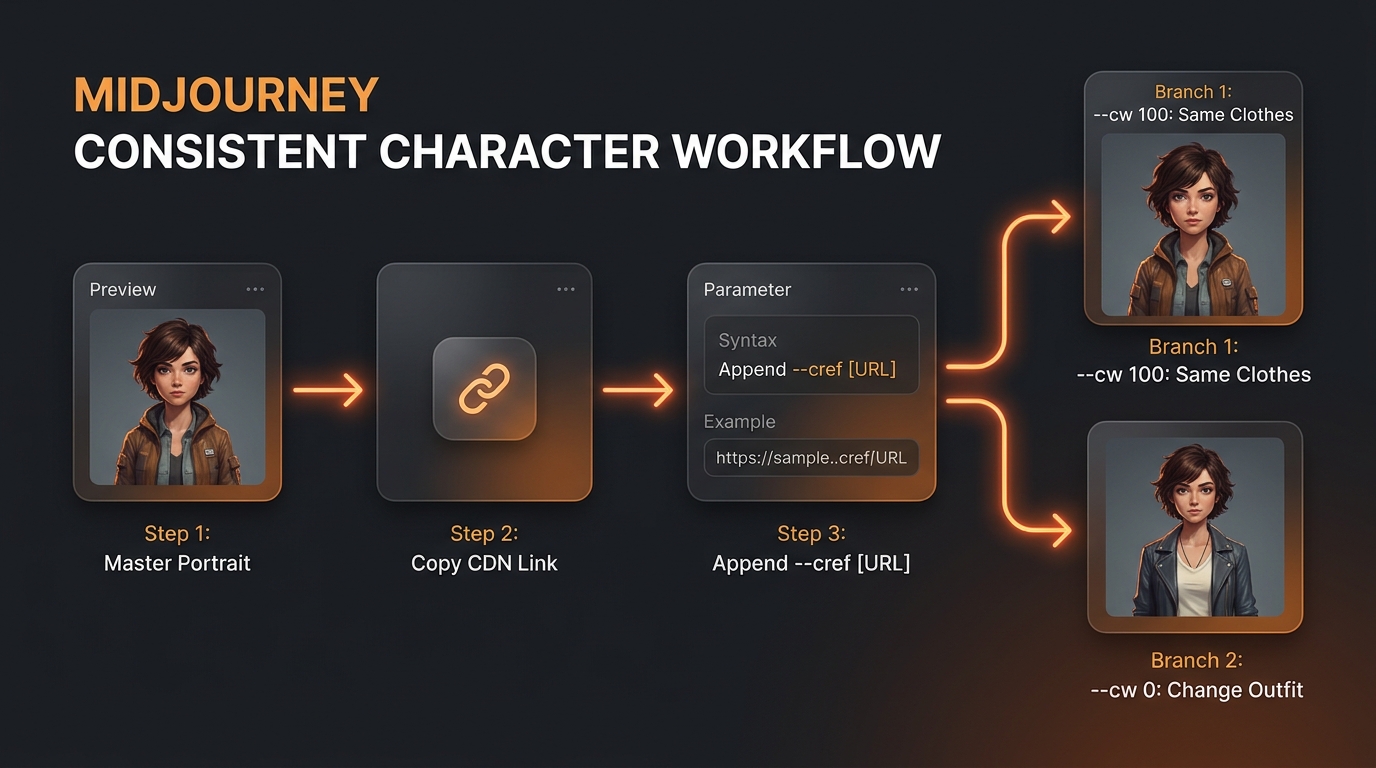
In Midjourney (v6 / v6.1): Generate an initial clean, neutral master portrait. Copy the image URL and append
--cref [URL]to subsequent prompts. Use--cw 100to lock face, hair, and clothing together, or--cw 0to preserve only the facial structure while freely altering outfits, hairstyles, and environments.In FLUX.1 (Schnell / Dev): Because FLUX is a 12-billion parameter rectified flow transformer equipped with a massive T5-XXL language encoder, it does not use a direct
--crefparameter. Instead, build a Hyper-Specific Character Identity Dossier using unchanging descriptive anchor tokens (bone structure, ethnic traits, specific scars, exact eye hue, haircut styling). Maintain seed continuity for subtle variations, or leverage specialized zero-shot adapters like PuLID-FLUX, FLUX.1 Redux, or custom-trained LoRA models for pixel-level likeness.
Below is the complete, production-tested methodology used by professional AI storytellers, concept artists, and prompt engineers on Promzio.
1. The Core Challenge: Why Generative AI Suffers from "Character Drift"
Every digital creator attempting to produce an AI-illustrated comic, graphic novel, children's book, or virtual brand ambassador inevitably hits a wall known as Character Drift.
In standard diffusion and flow-matching architectures, each new prompt query generates a fresh path through a multi-billion-dimensional latent space. Even if you type "the same 28-year-old female detective with green eyes," the model samples random noise patterns unless instructed otherwise. In one generation, she possesses sharp cheekbones and an angular jaw; in the next, her facial structure softens, her nose profile widens, and her hair color drifts from auburn to light chestnut.
The Character Drift Dilemma in Generative AI:
* Standard Prompting:"Detective Elena in an office"➔ Face A (Random Noise Sample) vs"Detective Elena running outside"➔ Face B (Mutated Facial Features).
* Consistent Character Architecture:Master Anchor Dossier + Reference Parameter (--cref / LoRA / Token Lock)➔ Face A preserved with high fidelity across 50+ unique camera angles, lighting conditions, and outfits.
Achieving true visual continuity requires converting your character from a vague conceptual description into a concrete mathematical anchor. If you have explored our foundational guide on how to create realistic AI photos, you already understand how lighting optics and focal lengths influence human realism. Consistent character creation demands an even stricter standard: locking somatic features in place so that the subject remains instantly recognizable across your entire visual project.
2. What Are "Consistent Character AI Prompts" and Why Do They Work?
A consistent character AI prompt is a structured prompt framework designed to constrain an image generator's latent space around a permanent set of facial geometry, somatic traits, and aesthetic signatures across varying scenes, poses, and lighting environments.
Unlike casual prompts that rely on loose adjectives (e.g., "a handsome man, tall, athletic"), production-grade character prompts utilize a Tri-Layer Architecture:
The Biological Anchor Layer (Fixed): Permanent facial anatomy, iris pigmentation, epicanthic folds, ear curvature, skin undertone, natural scars, and distinct facial asymmetries. These tokens remain 100% identical in every prompt.
The Contextual Variable Layer (Dynamic): Dynamic camera focal length, emotional expression, kinetic pose, ambient environment, wardrobe, and lighting schemes. These change according to the narrative requirements of each shot.
The Engine Directive Layer (Technical Flags): Model-specific parameters (such as
--cref,--cw,--sref, fixed seed values, CFG guidance scales, and LoRA trigger tokens) that dictate how strictly the neural weights prioritize identity over scene context.
By cleanly separating your prompts into these three distinct layers, you can swap backgrounds, emotions, and wardrobe while keeping your subject unmistakably identical.
3. Midjourney Method: Step-by-Step Character Consistency Masterclass
Midjourney transformed generative character creation with the introduction of its official Character Reference engine. If you are familiar with our comprehensive manual on how to write AI image prompts that work, applying parameter flags will feel intuitive. Follow this four-step blueprint to achieve professional consistency inside Discord or the Midjourney Web Editor.
Step 1: Crafting the Master Character "Anchor" Sheet
Never start with an intense action scene or an elaborate environment. Your initial generation must be a clean, neutral, evenly illuminated portrait shot on a simple studio backdrop. Busy backgrounds confuse Midjourney's feature-extraction algorithm during the reference phase.
Master Anchor Prompt (Copy & Paste):
/imagine prompt: Clean character design portrait of a 32-year-old marine biologist named Elena Rostov, striking emerald-green eyes with hazel flecks, sun-kissed olive complexion, sharp defined jawline, messy dark brown chin-length bob with subtle honey highlights, faint vertical scar through left eyebrow arch, neutral calm expression, soft cinematic diffuse studio lighting, neutral gray backdrop, shot on 85mm prime lens, f/2.8, natural human skin texture, high fidelity --ar 16:9 --v 6.1 --style rawPro Tip: Select the single best quadrant result (U1, U2, U3, or U4) and upscale it. Always use an upscaled individual render rather than a 4-grid composite image as your reference URL.
Step 2: The Character Reference (--cref) Protocol
Once you have upscaled your master anchor portrait:
Open the image in full resolution.
Right-click and copy the direct image link (or click the URL on the Midjourney Web Editor). Ensure the link ends in
.png,.jpg, or.webp.Append the
--crefparameter to the end of your new prompt string, followed by a space and the URL.
According to the official Midjourney Character Reference Documentation, the model isolates facial structure, hair silhouette, and somatic proportions from this reference link and transfers them into the newly described environment.
Step 3: Mastering --cw (Character Weight)
The --cw parameter ranges from 0 to 100 and controls how much visual data Midjourney carries over from your reference portrait:
--cw 100(Default): Transfers the face, hair, and the exact clothing. Use this setting when your character wears a signature uniform, recurring suit, or superhero costume across consecutive panels.--cw 0: Strips away original garments and hair styling, transferring only the facial geometry and bone structure. This is mandatory whenever your character changes clothes, enters a different historical era, or gets drenched in rain.--cw 20to--cw 50: Preserves facial likeness and primary hair pigmentation while granting Midjourney creative freedom to restyle the hair and generate context-appropriate clothing.
Example: Changing Wardrobe and Environment with --cw 0
/imagine prompt: Elena Rostov wearing a heavy distressed leather aviator jacket and flight goggles, sitting inside the cockpit of a vintage 1940s biplane, golden hour side-lighting pouring through the canopy, wind blowing loose strands of hair, cinematic composition, photorealistic --ar 16:9 --v 6.1 --style raw --cref https://s.mj.run/your-character-url --cw 0Step 4: Multi-Angle Expression and Action Workflows
To avoid perspective distortion during extreme camera angles (profile views, dynamic motion, or low-angle shots), generate a 3-view turnaround character sheet during your initial planning phase:
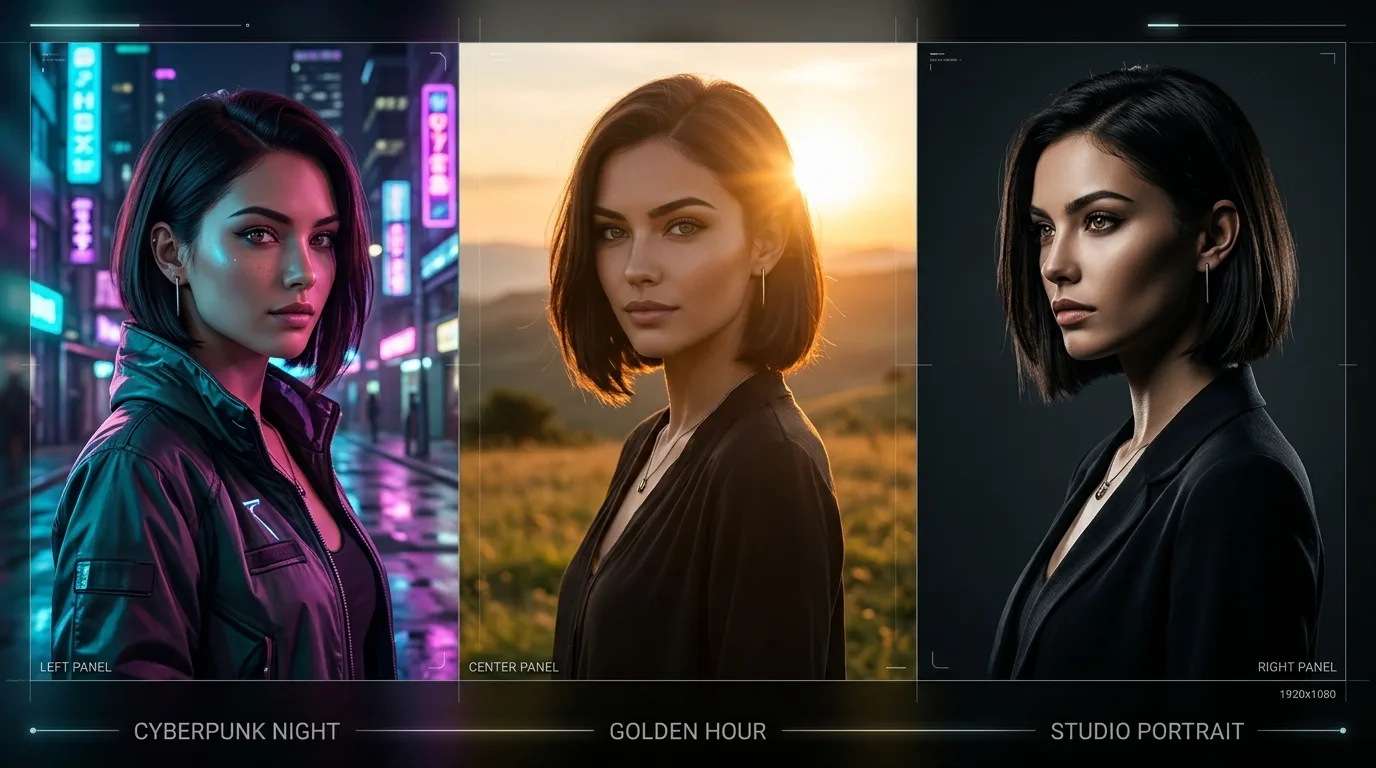
/imagine prompt: Character sheet turnaround, multiple views of Elena Rostov, 32-year-old marine biologist with short dark brown bob and emerald eyes, front view, 90-degree side profile view, 45-degree angle view, identical facial features, neutral lighting, plain background --ar 16:9 --v 6.1 --style rawUsing the URL of a multi-angle turnaround sheet with --cref gives Midjourney 3D volumetric context, significantly improving facial accuracy during complex physical poses. (You can study multi-angle lighting framing in our featured Cinematic Triptych Portrait prompt, which harmonizes three intimate camera angles in a single output).
4. FLUX.1 Method: Next-Gen Character Consistency Without Direct --cref
Developed by Black Forest Labs, the FLUX.1 model family (FLUX.1-dev and FLUX.1-schnell) represents a massive leap in prompt adherence and anatomical fidelity. Because FLUX combines a 12-billion parameter Rectified Flow Transformer (MMDiT) with a massive T5-XXL language model, it processes complex descriptive syntax with remarkable precision.
FLUX does not feature a native CLI parameter like --cref. Instead, professional creators achieve extraordinary character consistency in FLUX through three dedicated techniques:
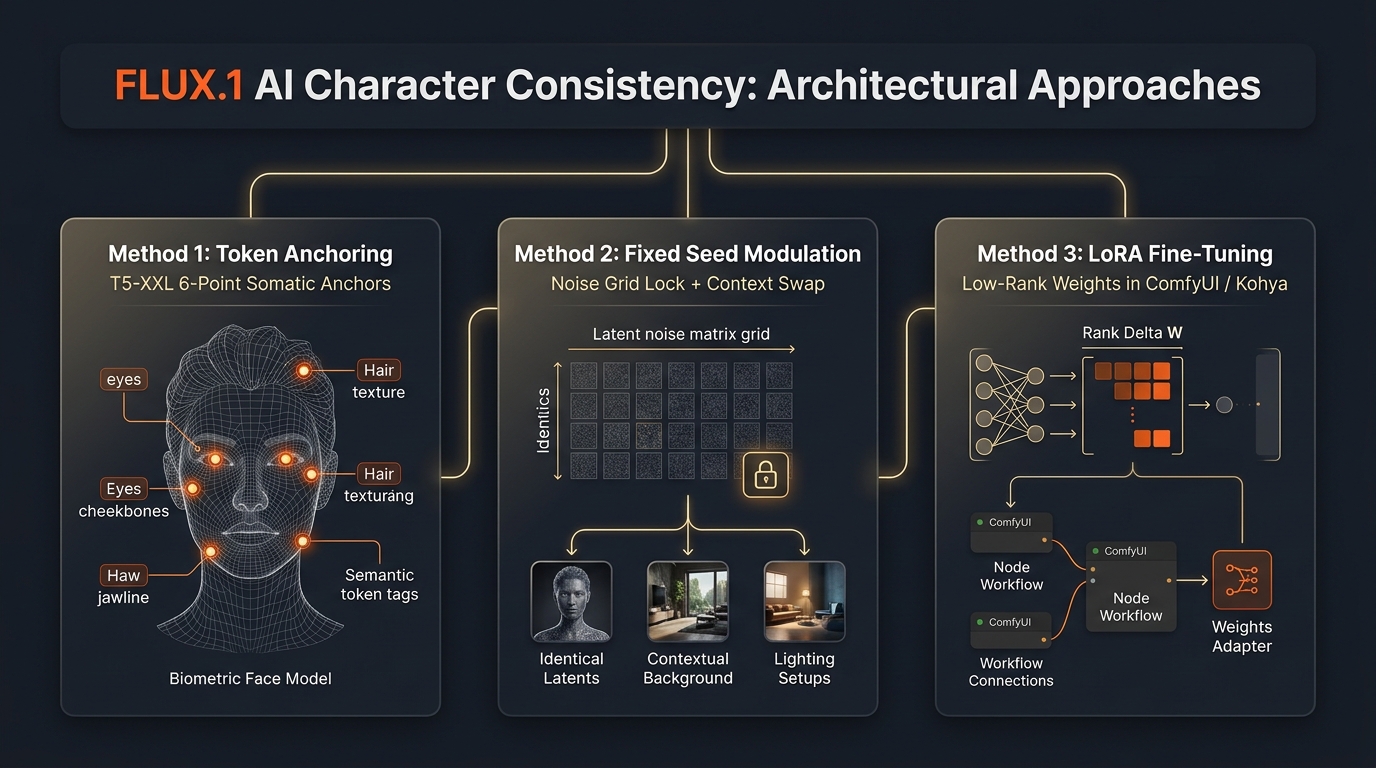
Method 1: The Multi-Attribute "Anchor Prompting" Architecture
Because the T5-XXL encoder parses natural language descriptive clauses rather than isolated keyword tags, assigning your character a unique compound descriptor combination prevents the model from collapsing into generic archetypes.
Avoid generic descriptions like: "A young marine biologist."
Instead, apply a structured 6-Point Descriptor Formula:
Unique Name + Demographic Tag: "Elena Rostov, a 32-year-old marine biologist"
Fixed Bone & Facial Structure: "sharp defined jawline, high cheekbones, almond-shaped emerald-green eyes with hazel flecks"
Permanent Micro-Identities: "a faint 2cm vertical scar through her left eyebrow arch, light sun freckles across the bridge of her nose"
Permanent Hair Silhouette: "messy chin-length dark espresso bob with subtle honey highlights"
Expression & Action (Variable): "intently analyzing a glowing specimen under microscope light"
Camera & Environment (Variable): "dimly lit marine research station, soft fluorescent edge lighting, 85mm f/1.8 prime lens"
Copy-Paste FLUX.1 Anchor Prompt Example:
A cinematic medium-shot portrait of Elena Rostov, a 32-year-old marine biologist with sharp defined jawline, almond-shaped emerald-green eyes with hazel flecks, and a faint 2cm vertical scar through her left eyebrow arch. Messy chin-length dark espresso bob with subtle honey highlights. Wearing a simple navy crewneck shirt, sitting inside a dimly lit coastal laboratory. Soft natural window illumination, authentic skin pores, 8k resolution, raw documentary aesthetic.When generating subsequent scenes, keep items 1, 2, 3, and 4 verbatim. Only change items 5 and 6. FLUX will recognize the semantic cluster and reproduce the exact facial geometry with near-zero drift.
Method 2: Fixed Seed + Contextual Token Swapping
When running FLUX via ComfyUI, Forge, or cloud API providers (as documented in the Black Forest Labs GitHub Repository):
Generate your base portrait and note the specific
seednumber.Lock the seed value across consecutive generations.
Alter only the context, action, or camera position within your prompt.
Keep your guidance scale between
3.0and3.5(the optimal range for FLUX.1-dev).
Because the initial noise field remains constant, the underlying facial geometry stays pinned, enabling natural changes in mood, lighting, and wardrobe.
Method 3: LoRA Training, PuLID-FLUX, and FLUX.1 Redux Workflows
For commercial visual productions—such as episodic graphic novels, recurring virtual mascots, or commercial campaigns—advanced adapters offer pixel-perfect likeness:
Custom LoRA Fine-Tuning: Train a lightweight LoRA (1,200 to 1,800 steps) on 15–20 clean, varied crops of your character using Kohya-ss or AI-Toolkit. Calling the custom trigger token gives you 99% facial parity across any pose, lighting condition, or costume.
PuLID for FLUX (Pure and Lightning ID): A dedicated zero-shot identity preservation pipeline that embeds reference face features directly into the FLUX transformer without training a separate model.
FLUX.1 Redux: The official image adapter from Black Forest Labs, designed to condition generation on an existing input image for consistent visual restyling and iterative refinement.
5. The Universal "Character Identity Dossier" Framework
Before typing your first generation prompt, document your character in this reusable Prompt Blueprint. Keeping this dossier accessible ensures disciplined continuity across every chapter, scene, and platform.
### CHARACTER IDENTITY DOSSIER (TEMPLATE)

[IDENTITY ANCHOR]
- Full Name / Identifier: Elena Rostov
- Apparent Age & Heritage: 32-year-old, Eastern European / Mediterranean descent
- Bone Structure: Sharp defined jawline, high cheekbones, slender neck
- Eyes: Almond-shaped emerald-green eyes with hazel flecks, dark natural eyebrows
- Nose & Mouth: Straight narrow nose bridge, subtle natural lip curvature
- Hair: Messy chin-length dark espresso bob with subtle honey highlights
- Micro-Identities (Crucial): Faint 2cm vertical scar through left eyebrow arch, light bridge freckles

[WARDROBE MATRIX]
- Primary / Professional: Heavy weathered yellow marine rain slicker, dark thermal baselayer
- Secondary / Casual: Navy blue crewneck knit sweater, faded work denim
- Era / Special: 1920s vintage art deco black flapper dress with glass beadwork
- Accessories: Compact dive watch on left wrist, silver ear studs

[CAMERA & RENDERING PROFILE]
- Default Focal Length: 85mm portrait / 35mm wide narrative
- Aesthetic Signature: 35mm film grain, balanced color palette, authentic naturalistic lighting
Enforcing this structured dossier eliminates vague descriptive drift. By feeding the diffusion model deterministic biometric signals, you can explore specialized prompts in our realistic photos prompt collection while preserving your character's exact identity from the opening frame to the final cut.
6. Real Working Prompt Examples (Side-by-Side Midjourney & FLUX)
Here are three real-world production scenarios demonstrating how to construct prompts for both engines using the Elena Rostov character dossier.
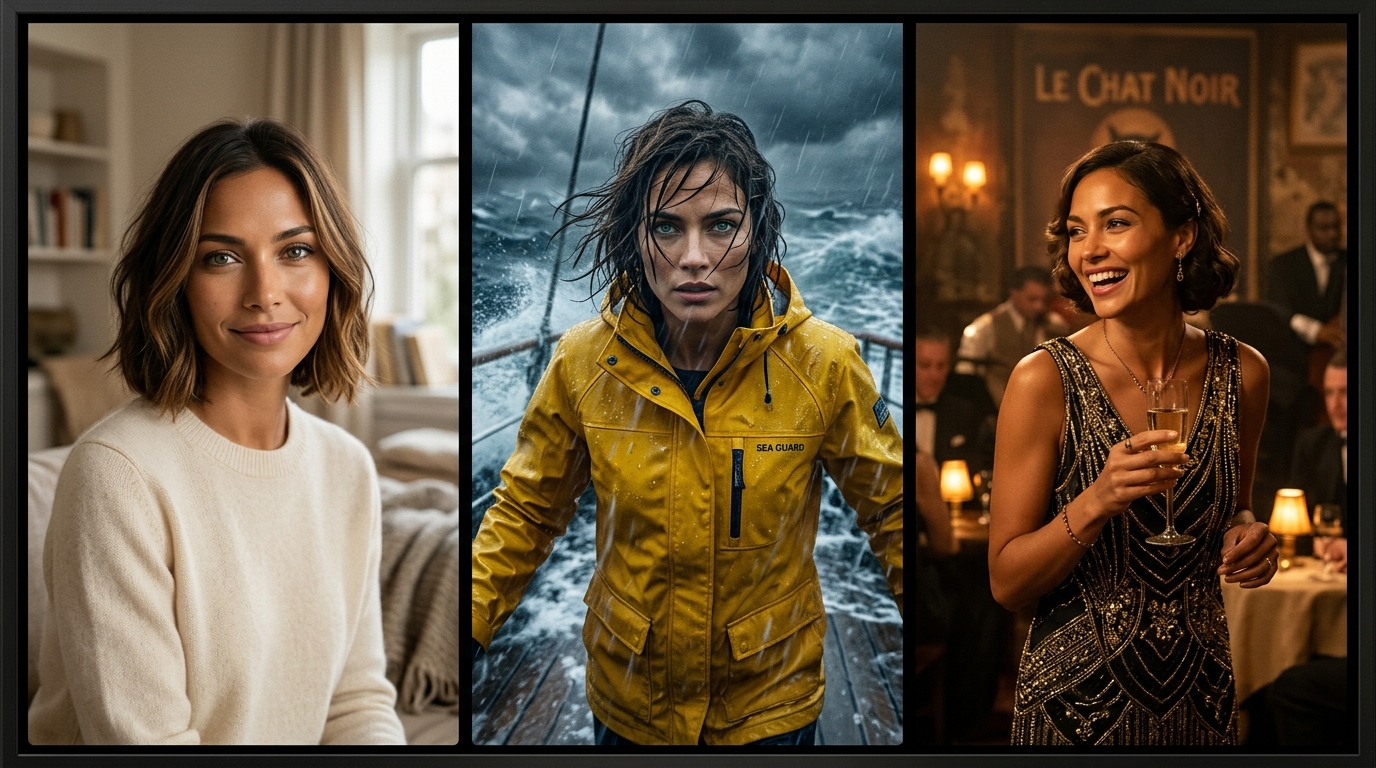
Scenario A: Establishing Close-Up Portrait (Setting the Identity Anchor)
Production Objective: Establish clean biometric landmarks with maximum optical clarity and natural skin micro-texture.
Midjourney v6.1 Implementation:
/imagine prompt: Close-up cinematic portrait of Elena Rostov, a 32-year-old marine biologist with striking emerald-green eyes, sun-kissed olive complexion, sharp collarbones, and messy dark brown bob with honey highlights. Soft natural morning daylight, water reflections casting subtle light patterns on her face, neutral contemplative expression, shot on Hasselblad H6D-100c, 100mm macro lens, f/2.0, genuine skin micro-texture, hyper-detailed --ar 16:9 --v 6.1 --style raw(Upscale your favored generation, copy the direct image link, and save it as your master reference URL: https://s.mj.run/elena-master).
FLUX.1-dev Implementation:
A photorealistic tight close-up portrait of Elena Rostov, a 32-year-old marine biologist. She has intense emerald-green eyes with hazel flecks, sun-kissed olive skin with natural pores, a sharp jawline, and a messy chin-length dark brown bob with fine honey highlights. Subtle natural water reflections bounce across her neck and cheek. Shot on Hasselblad H6D-100c, 85mm f/1.8 lens, shallow depth of field, authentic filmic grain, balanced color palette, unedited editorial photography.Scenario B: Dynamic Action & Weather Shift (Maintaining Face Under Pressure)
Production Objective: Place Elena into a stormy ocean environment, replacing casual wear with marine gear while keeping her facial structure locked.
Midjourney v6.1 Implementation:
/imagine prompt: Elena Rostov fighting torrential rain on the deck of an ocean research vessel during a violent midnight storm, wearing a heavy bright yellow marine slicker jacket, wet hair plastered to her forehead, intense focused expression shouting towards the bridge, dramatic ocean spray, crashing waves in background, rim lit by emergency ship spotlights, cinematic action photography --ar 16:9 --v 6.1 --style raw --cref https://s.mj.run/elena-master --cw 0Key Technique:
--cw 0is applied so that Midjourney switches from the original casual neckline to the heavy yellow rain slicker, while holding Elena's bone structure and facial likeness constant.
FLUX.1-dev Implementation:
Action shot on the slippery deck of an ocean research vessel at midnight during a brutal storm. Elena Rostov, the 32-year-old marine biologist with emerald-green eyes, sun-kissed olive skin, and a chin-length dark brown bob with honey highlights, is shouting commands through howling wind. Her wet hair clings to her forehead and cheeks. She wears a thick, weathered bright yellow marine rain slicker over dark thermal gear. Dramatic ocean waves crash in the dark background, lit by harsh vessel emergency spotlights. Intense kinetic motion blur on water droplets, sharp focus on her face, cinematic 35mm film still.Scenario C: Period Wardrobe & Historical Era Shift
Production Objective: Transport Elena into a 1920s vintage jazz club without mutating her identity or facial features.
Midjourney v6.1 Implementation:
/imagine prompt: Elena Rostov seated at a mahogany table in a smoky 1920s Parisian underground jazz lounge, wearing an intricate art deco beaded flapper dress, vintage finger-wave hairstyle, holding a champagne coupe, warm amber candlelight, hazy cigar smoke, brass saxophone player blurred in background, authentic period drama cinematography --ar 16:9 --v 6.1 --style raw --cref https://s.mj.run/elena-master --cw 0FLUX.1-dev Implementation:
A moody interior portrait in a 1920s underground jazz lounge in Paris. Elena Rostov, recognizable by her emerald-green eyes, sun-kissed olive skin, and sharp jawline, has her dark brown hair styled into glossy vintage finger-waves. She is wearing a sleeveless black flapper dress adorned with glittering art deco beadwork, holding an antique champagne glass. Dim amber table lamps, swirling cigarette haze, rich velvet curtains, warm sepia undertones, shot on Kodak vintage 35mm film, soft authentic lighting.7. Head-to-Head Comparison: Midjourney vs. FLUX.1 for Character Consistency
Both models offer exceptional visual quality, but their technical workflows differ fundamentally. Use this matrix to select the ideal platform for your production needs:
Evaluation Dimension |
Midjourney (v6 / v6.1) |
FLUX.1 (Dev / Schnell) |
|---|---|---|
Primary Consistency Engine |
Native |
T5-XXL Token Anchoring, Seed Locking, PuLID, & LoRA |
Learning Curve for Beginners |
Effortless: Paste reference URL and run |
Moderate: Requires disciplined natural language syntax |
Wardrobe & Outfit Swapping |
Seamless via |
High (swapping wardrobe tokens without modifying anchor) |
Complex Spatial Adherence |
Moderate (subject to aesthetic prior drift) |
Exceptional: Literal prepositional comprehension |
Text on Badges & Clothing |
Moderate (prone to letter scrambling) |
Industry-Leading: Flawless rendering of names and logos |
Skin Texture & Micro-Imperfections |
Polished cinematic finish; subtle glamour sheen |
Authentic, un-airbrushed pores, wrinkles, and blemishes |
Deployment & Offline Privacy |
Cloud SaaS only (Discord & Web portal) |
Fully open weights; runs offline on local RTX GPUs |
Cost Structure |
Subscription tiers ($10 to $120 / month) |
Free locally (Schnell/Dev) or pay-as-you-go APIs |
Best Production Use Case |
Rapid concept art, editorial fashion, web comics |
Commercial campaigns, local pipelines, LoRA avatar series |
8. Seven Pro-Tips to Prevent Character Drift in Long-Form Storytelling
Even seasoned prompt architects encounter subtle drift over extended projects. Implement these seven battle-tested guardrails to maintain disciplined continuity:
1. Assign an Unconventional "Micro-Feature"
Broad descriptions like "pretty woman" or "handsome man" guarantee drift because thousands of celebrity faces compete in that region of latent space. Equip your character with an unmistakable visual anchor:
A faint 2cm vertical scar through one eyebrow arch
Two distinct silver ear studs on the left earlobe
Heterochromia (e.g., right eye ice-blue, left eye hazel)
A distinctive silver streak through dark espresso hair
These specific tokens act as high-weight anchors that bind the generative output across disparate prompts.
2. Lock Your Lighting Palette with Style References
In Midjourney, pair your character reference with a Style Reference (--sref):
--cref https://s.mj.run/elena-master --sref https://s.mj.run/lighting-style --cw 80This prevents skin tone from shifting drastically between outdoor noon sun and interior moody lighting.
3. Maintain Consistent Camera Focal Lengths
A portrait captured on a 24mm wide-angle lens exhibits optical barrel distortion (enlarged nose and rounded cheeks), whereas an 85mm or 105mm telephoto lens compresses perspective and squares the jawline. Switching focal lengths haphazardly makes your character appear to gain or lose weight. Specify a fixed lens standard (such as "shot on 85mm prime lens") in your base dossier.
4. Avoid Name Clashes with Celebrities
If you name your character "Emma" or "Leo," generative models may inadvertently bleed in features of famous actors. Choose distinct, composite fictional names (e.g., "Elena Rostov", "Kaelen Voss", "Tarek Al-Mansoor") that carry zero celebrity bias in training datasets.
5. Eliminate Contradictory Style Descriptors
Never stack conflicting visual buzzwords like "photorealistic, anime, octane render, 3D unreal engine, vintage 35mm". This forces the diffusion sampler to oscillate between incompatible aesthetic domains, resulting in severe facial warping. Maintain a coherent, singular visual style.
6. Use Inpainting (Vary Region) for Expression Nuances
If an image generates with the perfect posture, clothing, and atmosphere, but an eye or mouth expression looks slightly unnatural, do not discard the entire render. Use Midjourney's Vary (Region) or FLUX inpainting inside ComfyUI. Mask only the face, prompt "Elena smiling warmly with gentle eye contact", and regenerate the masked area while preserving 100% of the surrounding composition.
7. Ground Volumetric Structure with Multi-Angle Turnarounds
Single front-facing reference images give neural networks limited depth information, leading to flat or warped profile renders. Generating a 3-view turnaround sheet (front view, 45-degree angle, 90-degree profile) and utilizing it as your reference base trains the model on the full 3D geometry of your character's skull and features.
9. Conclusion & Actionable Next Steps
Mastering consistent character AI prompts marks the transition from random generative experimentation to disciplined creative production. Whether you are illustrating an indie graphic novel, directing an episodic video series, or developing a virtual brand persona, consistency is the key to holding an audience's trust.
Action Checklist for Creators:
Establish Your Master Anchor: Render a clean, single-subject portrait under neutral 85mm studio lighting on a plain background.
Deploy Midjourney
--cref: Use--cw 100for uniform outfits; switch to--cw 0for wardrobe and historical era shifts.Deploy FLUX Token Anchors: Construct a 6-point descriptive dossier with permanent biometric micro-features (scars, bone structure, eye hues).
Harmonize Camera & Lighting: Prevent perspective warping by locking focal lengths and color palettes across scenes.
Refine with Inpainting: Polish minor expressions using regional masking rather than regenerating entire scenes.
Ready to bring your characters to life? Explore tested prompt blueprints across our AI prompt directory, master core prompt structuring with our complete prompt engineering guide, and start crafting cohesive visual stories today!
Frequently Asked Questions
Can I use real photos as a reference for consistent character AI prompts?
What is the difference between --cref and regular Image Prompts in Midjourney?
Why does my character's clothing change when I use --cref in Midjourney?
How do consistent character AI prompts work in FLUX if there is no --cref command?
Does the --seed parameter guarantee character consistency across different prompts?
Can I combine multiple character references in a single Midjourney prompt?

Arjun Mehta
Lead Generative AI Artist & Prompt Architect
Former commercial photographer and 3D visualizer from Mumbai. Specializes in photorealistic portraiture, cinematic lighting setups, and high-fidelity Midjourney & Flux.1 prompt formulations.