Guide
The Complete Guide to Writing ChatGPT Image Prompts That Look Truly Professional
Stop settling for waxy plastic faces and generic digital art. Learn the 6-pillar framework for writing professional ChatGPT image prompts that deliver authentic textures, cinematic lighting, and studio-grade composition.
Direct Answer: What Makes ChatGPT Image Prompts Look Truly Professional?
Writing professional ChatGPT image prompts requires moving away from generic hype words like "photorealistic," "8K," or "hyper-detailed." Instead, professional results depend on descriptive technical precision across six foundational visual pillars:
Specific subject anatomy and candid expressions (avoiding symmetrical, lifeless mannequin poses).
Physically accurate lighting setups (identifying light source, direction, diffusion, and color temperature).
Real-world optical parameters (specifying focal length, aperture values like f/1.8 or f/2.8, and camera elevation).
Authentic surface textures (describing skin pores, micro-wrinkles, fabric weaves, and subtle imperfections).
Atmospheric context and spatial layering (establishing distinct foreground, subject, and background depth).
Natural language negative guardrails (instructing the model to avoid synthetic sheen, oversaturation, and airbrushed rendering).
Because ChatGPT processes prompts using deep natural language semantics rather than disjointed keyword tags, framing your scene like a professional director or director of photography produces consistent, magazine-grade imagery on the first attempt.
Introduction: Why Most ChatGPT Images Look Fake (And How to Fix It)
We have all experienced the classic AI image disappointment. You open ChatGPT, type a prompt like "A professional businesswoman sitting in a modern office, ultra realistic, highly detailed," hit enter, and wait with anticipation.
A few seconds later, the screen renders an image that immediately triggers the uncanny valley. The skin looks like melted silicone. The teeth form a terrifying, unbroken bar of pure white enamel. The lighting comes from every direction at once with no believable shadows, and the background looks like a generic stock photo blurred through a cheap Gaussian filter.
The immediate reaction is to blame the AI engine. But modern image generation models integrated into ChatGPT—such as OpenAI's DALL-E 3 framework and current multimodal visual generators—possess astonishing rendering capability. The underlying problem is rarely the model. The problem is prompt communication.
Most creators speak to image generators using either search-engine shorthand or an avalanche of meaningless buzzwords. When you ask ChatGPT for "high quality," the model defaults to an algorithmically averaged baseline of digital art across the internet. That statistical average is slick, saturated, symmetrical, and completely artificial.
To achieve images that look like they were commissioned by a high-end editorial magazine, captured on medium-format analog film, or staged for an international commercial campaign, you need a repeatable system.
In this comprehensive guide, we will unpack the exact mechanics behind writing ChatGPT image prompts, break down real-world tested prompt blueprints, and explore the professional techniques we use across the Promzio AI prompts library to generate breathtaking, human-grade visuals.
The Underlying Engine: How ChatGPT Interprets Image Prompts Differently
Before writing a single word of your prompt, you must understand how ChatGPT generates images compared to standalone diffusion engines like Midjourney or Stable Diffusion.
In tools like Midjourney, creators communicate through comma-separated keyword stacks and parameter flags (such as --v 6 --ar 16:9 --style raw). If you paste a paragraph of conversational prose into Midjourney, the model often drops half of your instructions.
ChatGPT operates on the exact opposite principle. Built on natural language transformers documented in the official OpenAI image and vision documentation, ChatGPT thrives on narrative coherence, contextual relationships, and descriptive sentence structure.
Amateur Midjourney Prompt:
woman, red coat, street, rain, neon, 8k, photorealistic, cinematic lighting --ar 16:9

Professional ChatGPT Prompt:
A cinematic street portrait captured during an autumn twilight drizzle in central Edinburgh. The subject is a 34-year-old woman with natural freckles and damp, wavy auburn hair tucked into a heavy wool trench coat. Soft sodium-vapor streetlights reflect off wet cobblestones behind her, casting warm amber rims along her shoulders, while a gentle cool ambient blue light illuminates her profile. Shot on a 35mm film camera with a 50mm f/1.4 lens, producing a shallow depth of field with organic film grain and subtle chromatic aberration along the edges.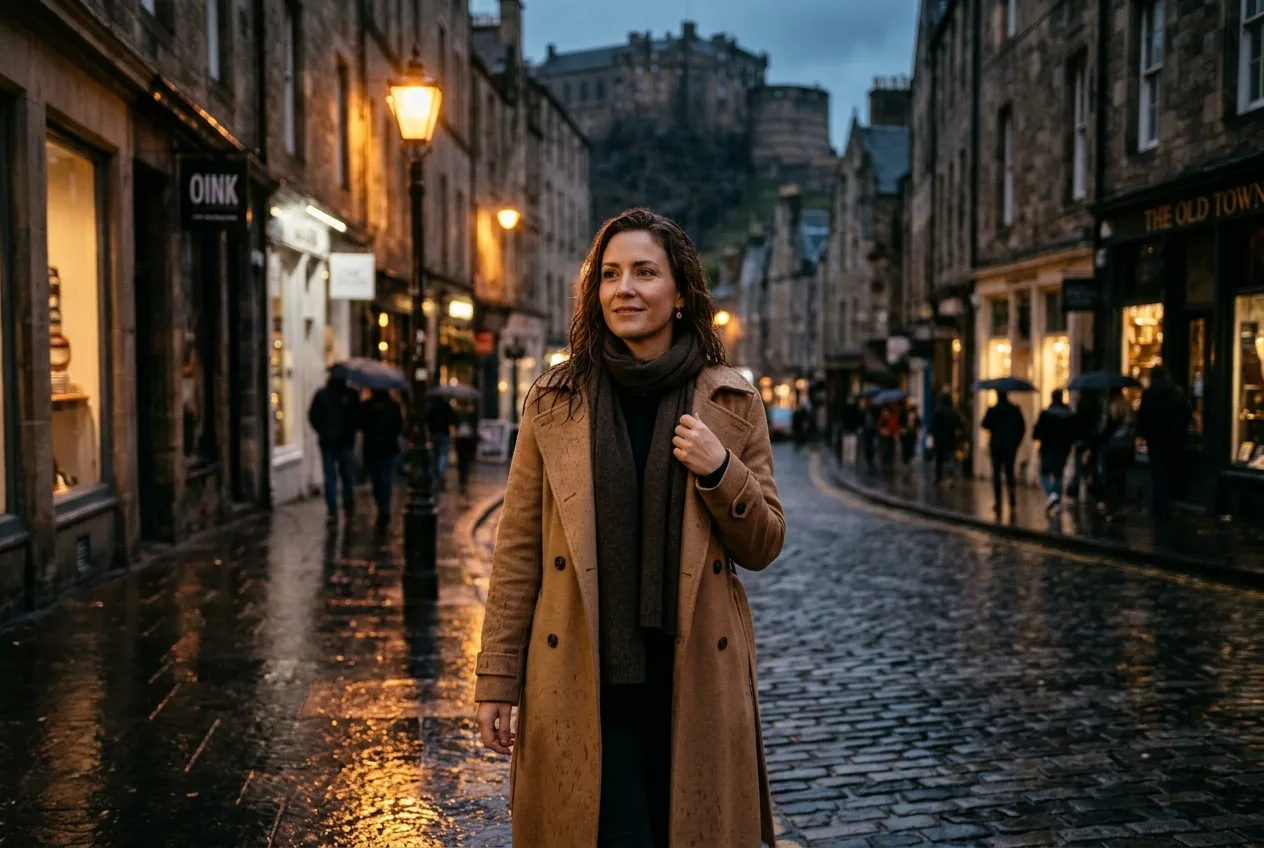
The "Hidden Prompt Expander" Inside ChatGPT
There is a critical mechanism many creators overlook: ChatGPT automatically rewrites your prompt before sending it to the rendering pipeline.
If you type a brief instruction like "make a cute puppy on grass," ChatGPT expands that input into an elaborate descriptive paragraph. While this helps novice users get decent pictures, it creates severe frustration for professionals because ChatGPT frequently injects unwanted whimsical storytelling, fantasy elements, or cartoonish exaggerations into your concept.
To take full control of your ChatGPT image prompts, you must provide sufficient technical specificity so the internal parser respects your exact compositional vision rather than improvising its own. If you want strict adherence without unsolicited modifications, preface your prompt with:
"Generate an image adhering strictly to the exact visual parameters and aesthetic specifications detailed below. Do not add fantasy elements or alter the core composition."
This simple constraint instantly locks the generator into execution mode rather than creative embellishment mode.
The 6-Pillar Professional Architecture for ChatGPT Image Prompts
Every publication-ready AI image generated through ChatGPT relies on six architectural pillars. When structured methodically, these pillars give you granular command over every pixel in the frame.
[1. Subject & Posture] + [2. Environment & Depth] + [3. Lighting Physics] + [4. Optics & Composition] + [5. Texture & Color Palette] + [6. Negative Guardrails]Pillar 1: Subject Definition, Candid Pose, and Micro-Expressions
The fastest way to spot an amateur AI image is looking at the subject's face and posture. Amateur prompts describe subjects in sterile archetypes: "a handsome man," "a beautiful model," or "a cute barista." This forces the AI to output hyper-symmetrical, emotionless faces that look like 3D video game renders.
Professional prompting specifies:
Demographic nuance and authentic age: Instead of "young woman," specify "a woman in her late 30s with fine expression lines around her hazel eyes and natural skin undertones."
Micro-expressions over blank smiles: Replace "smiling happily" with "a subtle, wry smirk," "an intense, focused gaze looking just off-camera," or "a contemplative, quiet expression with parted lips."
Dynamic, grounded body language: Give the subject a physical relationship to their surroundings. Have them lean against a weathered brick pillar, grip a ceramic mug with both hands, or look down while adjusting their cufflink.
Wardrobe materiality: Rather than saying "wearing a suit," describe "a structured charcoal herringbone wool blazer paired with an unbuttoned crisp white poplin shirt."
Pillar 2: Environmental Setting and Spatial Layering
Flat AI images happen when the prompt places a subject in an abstract or generic void. A professional visual always possesses three distinct spatial planes:
Foreground: An element close to the lens that adds immediate physical presence (e.g., out-of-focus raindrops on a window pane, the blurred edge of a café table, or gentle foreground foliage).
Midground: The focal plane where your primary subject lives and interacts.
Background: A rich, contextual environment with atmospheric depth rather than artificial blankness.
Instead of writing "a studio background," specify "a minimalist industrial loft with exposed sandblasted concrete walls, a single monstera plant casting soft shadows in the far corner, and tall steel-framed warehouse windows."
Pillar 3: Photographic Lighting and Shadow Physics
Light is the single most influential factor distinguishing a fake digital image from an authentic photograph. When light is unspecified, ChatGPT illuminates the entire canvas evenly, creating a flat, lifeless aesthetic.
To command professional mood, draw from proven cinematography techniques like three-point lighting, which utilizes a key light for definition, a fill light for shadow control, and a backlight (or rim light) to separate the subject from the background.
Key lighting terminology to incorporate into your ChatGPT image prompts:
Directional Golden Hour Light: Low-angle, warm sunlight (around 3200K color temperature) creating long, soft shadows and luminous rim lighting.
Softbox or Diffused North Window Light: Gentle, flattering illumination with soft gradient falloff across facial contours, ideal for realistic portraiture.
Cinematic Chiaroscuro: High-contrast, dramatic lighting influenced by Rembrandt, featuring deep, rich shadows on one side of the face with a distinct triangle of light on the shadowed cheek.
Volumetric God Rays / Atmospheric Haze: Visible shafts of light filtering through dust, steam, or morning mist, establishing tangible physical depth.
Practical Lighting: Relying on light sources visible within the scene itself, such as amber incandescent bulbs, neon signage, or candlelight.
Pillar 4: Camera Optics, Lens Selection, and Framing
AI engines understand photography when you feed them the vocabulary of physical camera hardware. While ChatGPT doesn't have an actual mechanical lens, its training dataset associates specific lenses and apertures with distinct geometric perspective, compression, and blur characteristics.
When composing your scene, consider the principles of visual balance such as the rule of thirds, placing focal elements along intersecting grid lines rather than dead-centering everything.
Combine your framing with optical controls that simulate real optical physics, especially depth of field, where a wide aperture produces creamy background blur (bokeh) while isolating your subject.
Lens / Camera Parameter | Optical Effect in ChatGPT | Best Use Case |
|---|---|---|
24mm Wide-Angle Lens | Expansive field of view, dynamic foreground scale, slight perspective distortion | Environmental portraits, architectural interiors, dramatic landscape scenes |
35mm Street Lens | Natural human eye perspective, immersive environmental context | Candid documentary, street photography, lifestyle branding |
50mm Prime ("Nifty Fifty") | Zero distortion, true-to-life proportions, versatile subject separation | Editorial fashion, casual portraiture, food and beverage photography |
85mm f/1.4 Portrait Lens | Flattering facial compression, creamy background blur, crisp subject isolation | High-end beauty portraits, corporate headshots, luxury product isolation |
100mm Macro Lens | Extreme 1:1 magnification, ultra-shallow depth of field, hyper-focused details | Watch dials, jewelry textures, water droplets, culinary garnish |
Pillar 5: Authentic Textures, Surface Details, and Color Grading
Why do AI faces look plastic? Because digital generators default to smooth noise reduction unless explicitly instructed otherwise. Real life is filled with texture, grain, dust, micro-scratches, and subtle imperfections.
To strip away the synthetic sheen in your ChatGPT image prompts, add descriptive sensory anchors:
Skin Realism: "Unretouched skin texture showing visible micro-pores, delicate freckles, natural skin oil highlights along the cheekbones, and subtle peach fuzz."
Material Textures: "Tactile, coarse woven Irish linen with visible threads, matte brushed brass hardware with slight fingerprint smudges, and weathered full-grain Italian leather."
Color Grading & Emulsion: "Graded in the style of Kodak Portra 400 film stock, featuring soft pastel highlights, rich warm midtones, gentle shadow rolloff, and fine organic 35mm grain."
Pillar 6: Negative Guardrails Phrased as Natural Language Directives
In earlier tools, creators used dedicated negative prompt boxes. In ChatGPT, negative guidance must be woven into your conversational instructions.
Never write a disorganized list like "no ugly, no bad hands, no blur." Instead, frame negative instructions as clear aesthetic standards:
"Aesthetic parameters: Deliver an authentic, unretouched photographic style. Avoid plastic airbrushed skin, synthetic digital gloss, oversaturated neon tones, exaggerated cartoon proportions, symmetrical mannequin poses, and artificial HDR bloom."
For creators looking to dive deeper into error correction, our dedicated guide on how to use the negative prompt stacking trick to fix AI image errors explains how to eliminate recurring anatomical and composition defects systematically.
Comparison Table: Amateur vs. Professional ChatGPT Image Prompts
To visualize how these six pillars transform an image concept, study this side-by-side comparison across different visual genres:
Element | The Amateur Approach | The Professional Approach | Resulting Visual Difference |
|---|---|---|---|
Subject Portrait | "A beautiful girl drinking coffee in Paris, 8k, photorealistic" | "A candid street portrait of a 29-year-old French woman sitting at a green wrought-iron café bistro table in Montmartre. She is mid-laughter, holding an espresso cup with both hands, wearing a cream ribbed knit turtleneck. 85mm f/1.8 lens, overcast Parisian morning light, soft background bokeh of Haussmann buildings." | Amateur yields a generic anime-influenced face with waxy skin. Pro yields an authentic, emotion-rich editorial photograph suitable for Vogue or travel campaigns. |
Product Showcase | "Luxury perfume bottle on a stone, cinematic lighting" | "A commercial studio product photograph of a minimalist amber glass perfume bottle with a matte black cylindrical cap. The bottle rests on a wet, rough-textured slate slab. Delicate water droplets cling to the glass. Raking sidelight from a diffused softbox illuminates the amber liquid, casting a warm caustic reflection on the surface. Clean 100mm macro shot." | Amateur produces a floating CGI render. Pro produces an ultra-crisp, commercial advertisement ready for an e-commerce storefront. |
Interior Design | "Modern luxury living room, realistic interior" | "An architectural photography showcase of a sunlit Japandi living room during early morning. Low-profile walnut sofa with natural oatmeal linen cushions, a cast-concrete coffee table holding an open ceramic art book, and floor-to-ceiling glass doors opening to a bamboo courtyard. Soft directional sunlight creates linear diagonal shadows across the white oak floorboards. 24mm tilt-shift lens perspective." | Amateur outputs a glossy 3D CAD visualization. Pro outputs a calm, published Architectural Digest magazine spread. |
Street Scene | "Cyberpunk street rainy night neon lights" | "A gritty photojournalistic capture of an alleyway in Shinjuku during a heavy downpour. A lone cyclist in a translucent yellow raincoat pedal past glowing neon signs in vermillion and cyan. Reflections shimmer across asphalt puddles with genuine wet reflections. Shot on 35mm film with CineStill 800T color science, visible halation around bright light sources, and realistic motion blur along the bicycle wheels." | Amateur produces generic purple-and-blue neon clutter. Pro captures a moody, narrative-driven cinematic still with authentic film chemistry. |
5 Real-World Tested ChatGPT Image Prompt Blueprints
Let us walk through five complete, copy-and-paste prompt templates across different commercial categories. You can test these immediately inside ChatGPT or explore hundreds of similar vetted formulas in our ChatGPT prompts collection.
1. The High-Fashion Editorial Portrait
A full-length high-fashion editorial portrait of a 32-year-old West African male model standing against a brutalist textured concrete wall. The model has sharp, defined cheekbones, a close-cropped buzz cut, and an intense, stoic expression looking slightly past the camera. He is dressed in an avant-garde oversized beige wool overcoat draped over structured wide-leg tailored trousers.

Lighting: Strong, low-angled late afternoon sunlight coming from the left frame, creating a stark chiaroscuro effect with sharp, dramatic shadows cast across the architectural concrete.

Camera & Optics: Shot on a Hasselblad H6D-100c medium format camera with an 80mm f/2.2 prime lens. Crisp edge-to-edge sharpness, true optical depth of field with subtle background softening.

Texture & Grading: Authentic skin texture showing real pores, hydration highlights, and natural skin imperfections. Color palette consisting of warm ochre, muted stone gray, and deep camel. No plastic skin smoothing, no cartoonish rendering, strictly editorial photography aesthetic.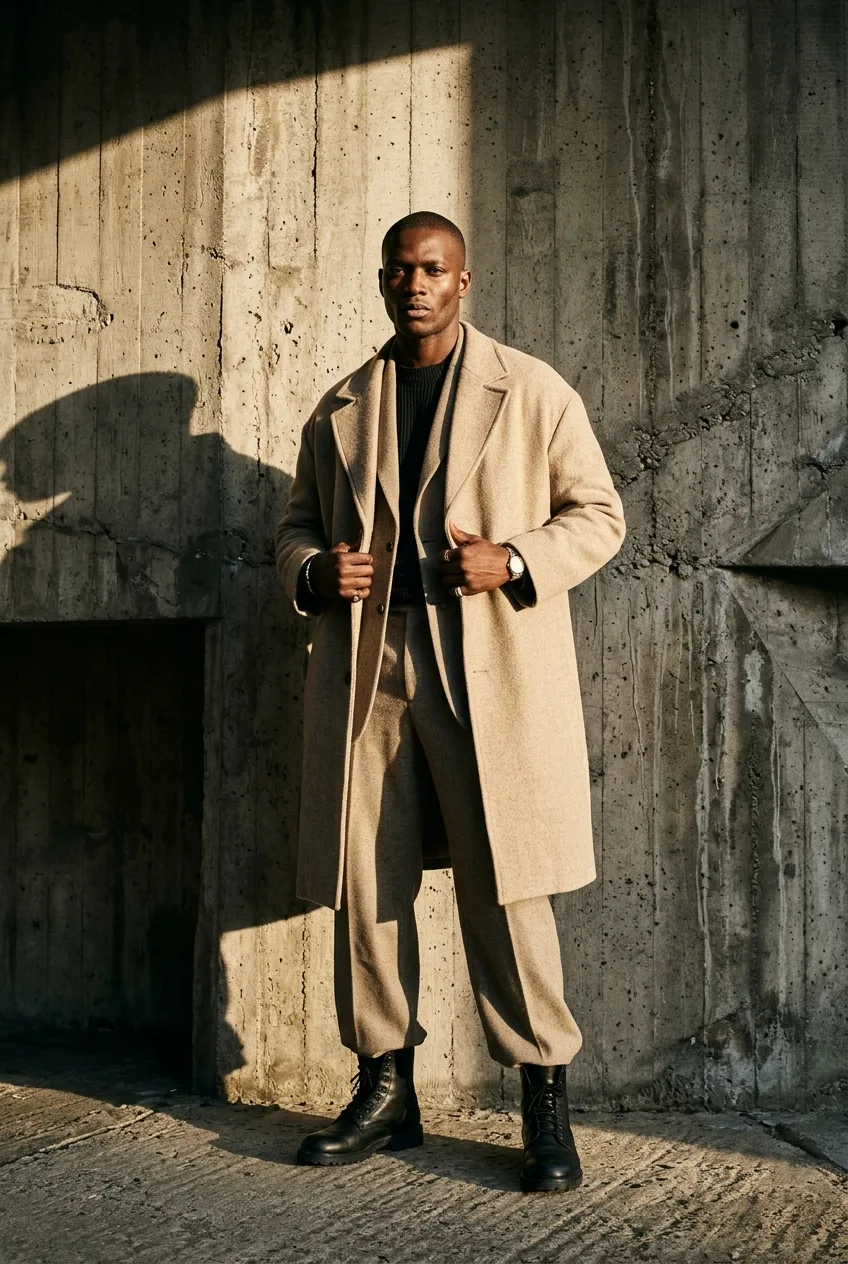
Why it works: It defines exact camera equipment, specific fashion styling, architectural context, and concrete lighting physics that eliminate the plastic mannequin effect.
2. Commercial Skincare & Cosmetics Product Still Life
A clean, minimalist commercial product photograph of a cylindrical frosted-glass cosmetic serum bottle with a white dropper dispenser. The bottle is placed off-center on a wet, naturally tumbled travertine stone pedestal surrounded by shallow, calm clear water. Delicate, crystal-clear ripples radiate across the water surface.

Lighting: Diffused studio backlight combined with a soft white reflector on the right side, illuminating the translucent golden serum inside the bottle and casting soft, luminous caustic patterns through the glass into the water.

Camera & Optics: Shot at eye level with a 90mm macro lens at f/4 to maintain complete tack-sharp clarity across the product label while smoothly blurring the soft botanical eucalyptus branch in the distant background.

Texture & Grading: Ultra-crisp glass reflections, realistic water meniscus tension around the stone base, matte paper label texture with crisp, legible typography. Pristine commercial e-commerce aesthetic, no digital noise, no distorted packaging geometries.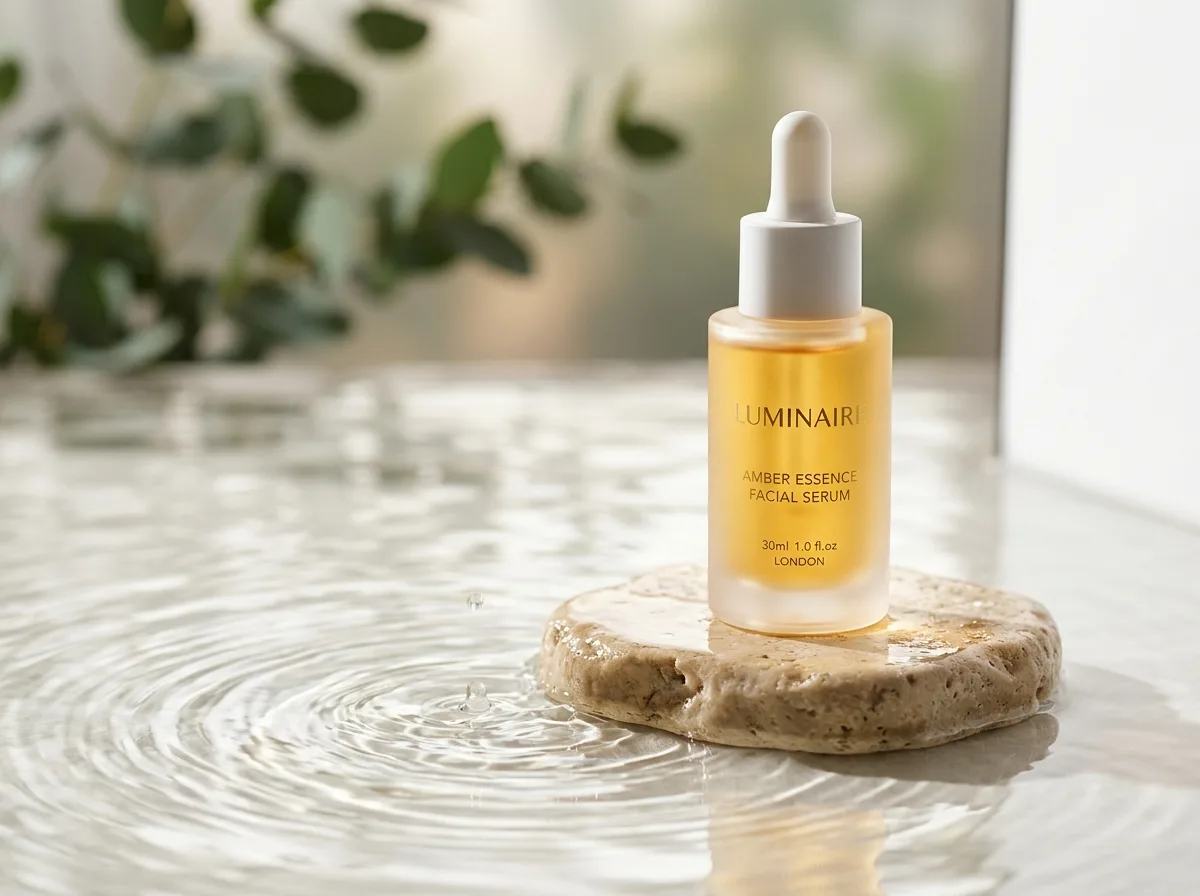
Why it works: Product photography fails when materials look synthetic. Specifying frosted glass, water surface tension, caustic refractions, and macro lens parameters guarantees high commercial fidelity. You can browse more commercial setups in our Product Photos category.
3. Scandinavian / Japandi Architectural Interior
An architectural interior photograph of a minimalist open-concept dining space in Copenhagen. In the center sits a handcrafted solid white-oak dining table accompanied by four Hans Wegner style paper-cord chairs. On the table rests a single matte ceramic vase with two dry branches.

Lighting: Soft, diffused overcast daylight streaming in through double-height black steel framed casement windows on the left wall, bathing the space in even, tranquil illumination with gentle, natural shadow gradients beneath the furniture.

Camera & Optics: Wide-angle 24mm architectural lens with corrected vertical perspective lines, captured from a seated chest-level vantage point to convey human scale. Deep depth of field at f/8, keeping both the foreground dining set and the background floating wood cabinetry in sharp focus.

Texture & Grading: Visible tactile wood grain on the oak table, subtle micro-texture on the lime-wash plastered walls, and natural matte finish on the polished light gray micro-cement flooring. Warm neutral Scandinavian color grading with muted olive, beige, and chalk tones.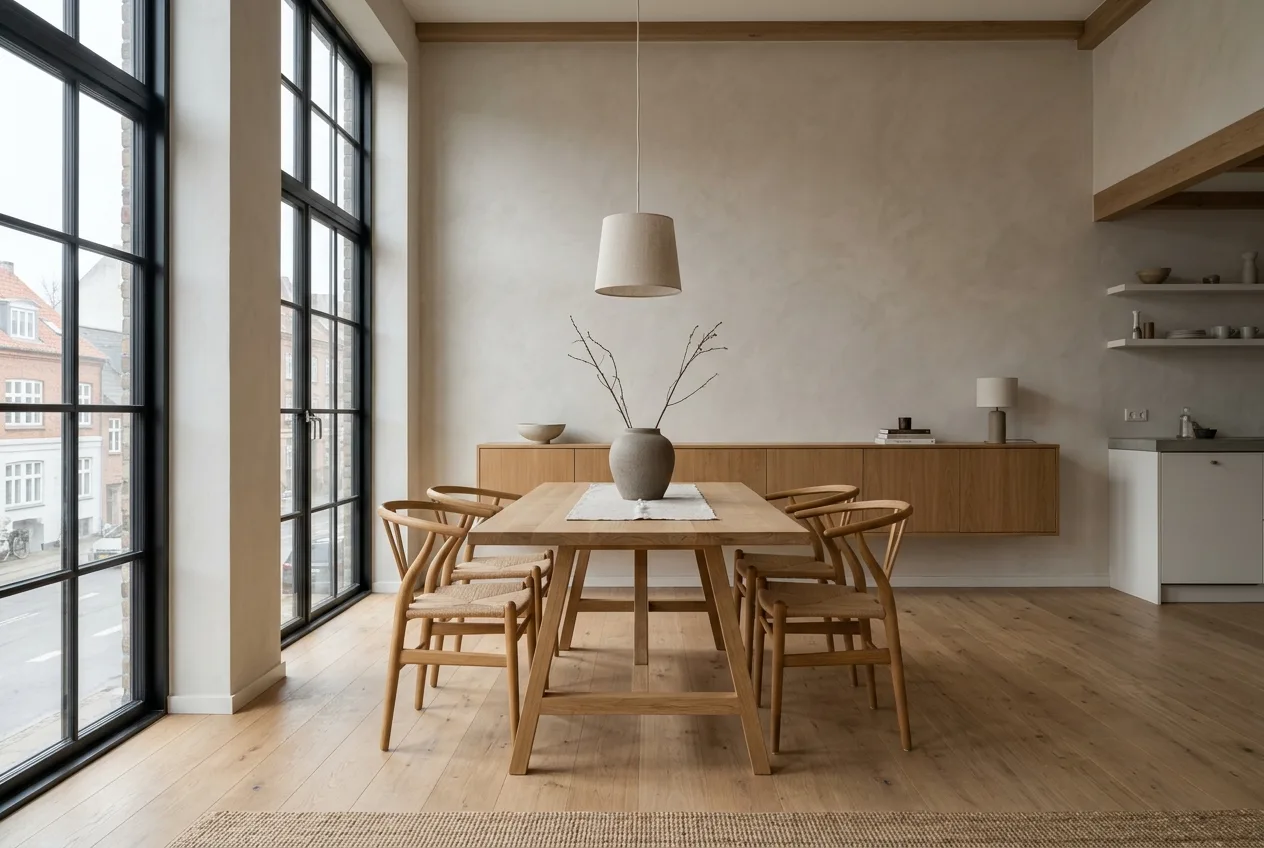
Why it works: Architectural photos look fake when lines are warped and walls are unnaturally smooth. Setting vertical perspective correction, lime-wash plaster texture, and soft daylight creates authentic interior imagery.
4. Candid Urban Street Documentary
A candid street photography still captured in Brooklyn during golden hour. A 45-year-old barista with rolled-up denim sleeves and tattooed forearms stands outside a corner coffee shop taking a brief break, leaning against an emerald-green tiled storefront while taking a sip of black coffee. Steam gently rises from the paper cup.

Lighting: Warm, directional 3500K sunlight striking his profile, creating an amber edge highlight along his jawline and hair, while the bustling city street behind him recedes into cool ambient evening shadow.

Camera & Optics: Street photography style shot on a Leica M11 rangefinder with a 35mm Summicron f/2 lens. Slight motion blur in the distant yellow cab passing in the background, keeping the subject frozen in time.

Texture & Grading: Kodak Tri-X 400 style organic black-and-white tonal scale OR rich 35mm color film grain, natural skin lines, real textile weave on denim, and authentic atmospheric city dust motes drifting through the sunlight beam. Unstaged, photojournalistic authenticity.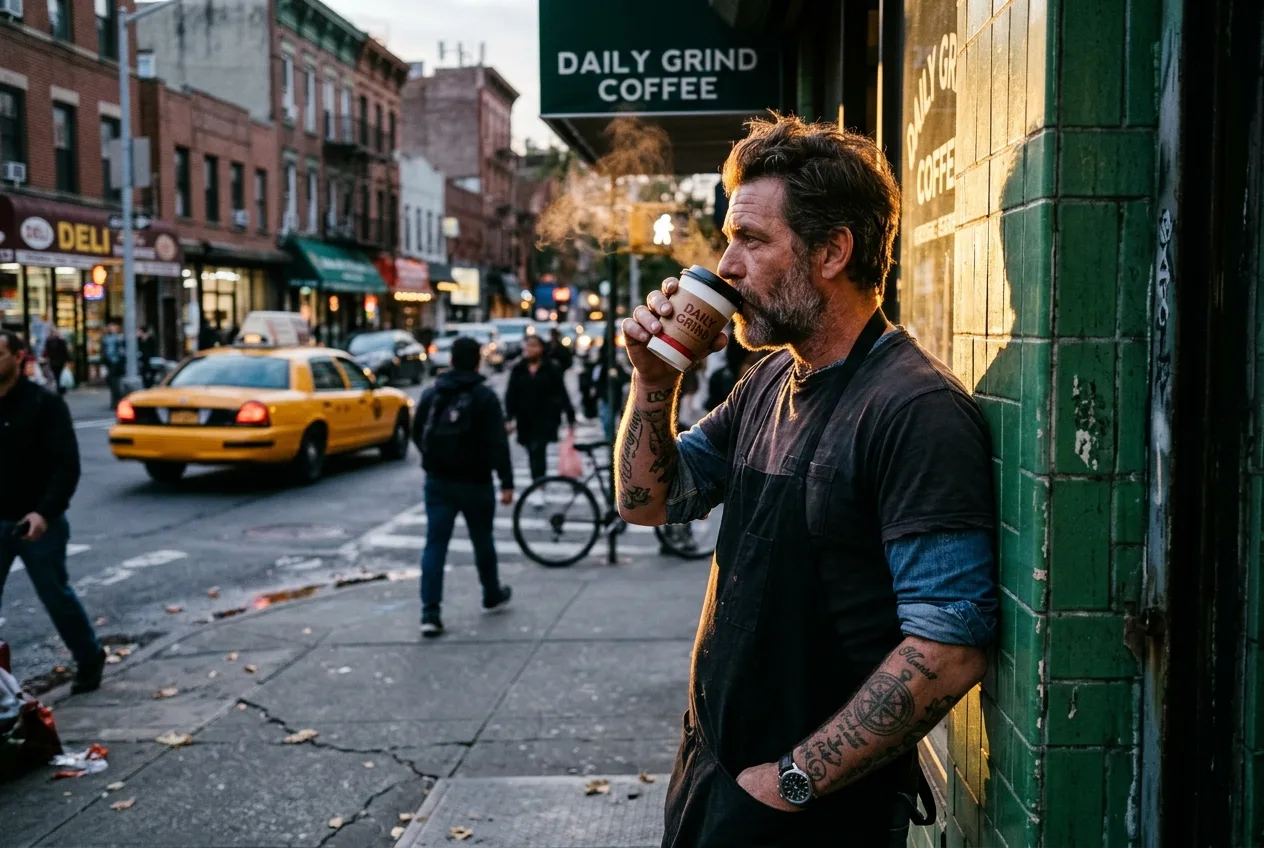
Why it works: By specifying a Leica rangefinder, 35mm focal perspective, and an unstaged narrative moment, ChatGPT produces a living, breathing scene rather than a posed stock image. For similar documentary approaches, check out our Realistic Photos category.
5. High-End 3D Character Design for Games or Animation
A high-detail 3D character design of an elderly dwarven clockmaker examining a miniature glowing mechanical brass heart. The character has a braided salt-and-pepper beard interwoven with tiny copper gears, expressive warm wrinkled eyes magnified behind a brass jeweler's loupe, and thick leather artisan aprons over a flannel shirt.

Lighting: Cozy, intimate split lighting: one side of the face is illuminated by the soft golden luminescence emitting from the internal clockwork heart, while the opposite side is bathed in cool moonlight filtering through a cluttered workshop window.

Camera & Optics: 50mm lens perspective, tight character bust framing with a shallow depth of field that gently melts the background workbench filled with tiny springs, cogs, and vintage calipers into soft orbs of light.

Texture & Rendering: Tactile clay-and-digital sculpt aesthetic with realistic subsurface scattering on the weathered skin, brushed brass metal patina with microscopic scratches, frayed leather stitching, and soft specular reflections. Pixar-meets-cinematic fantasy character concept art style.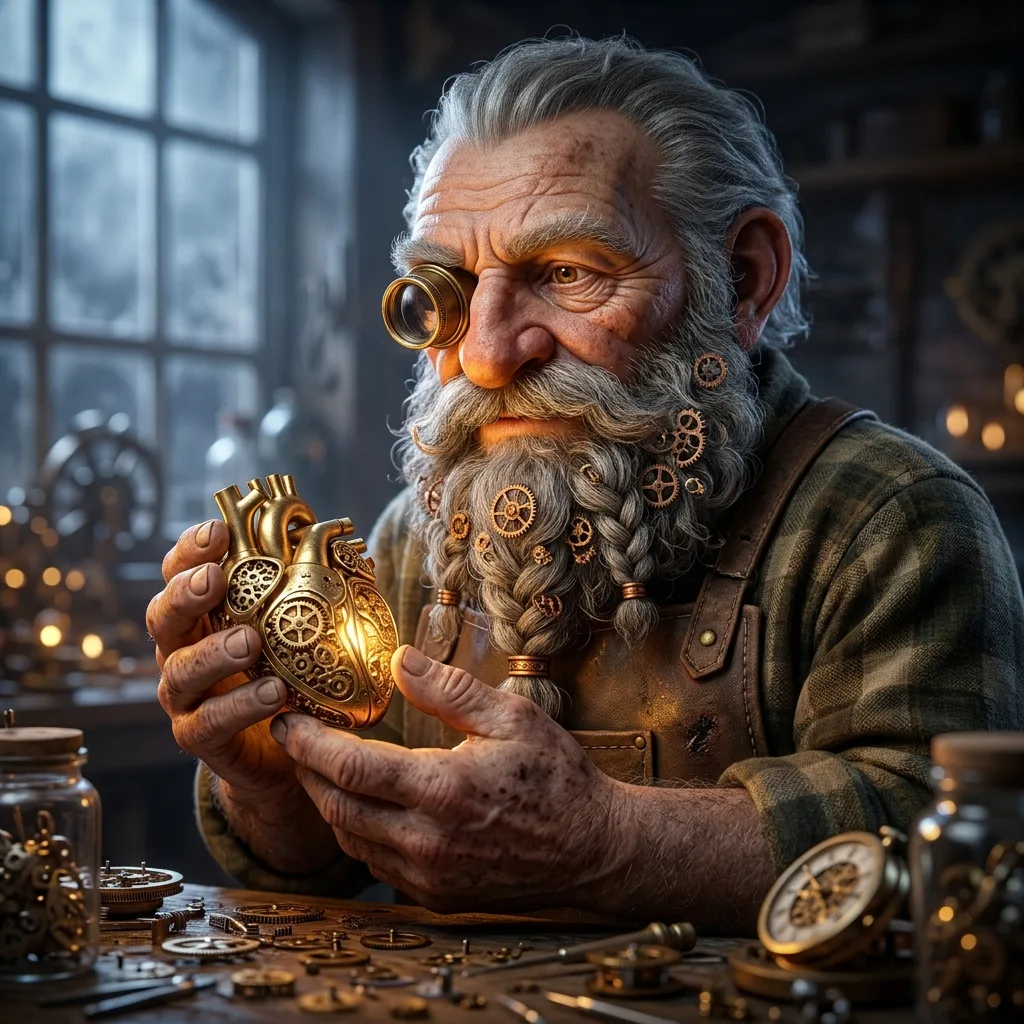
Why it works: 3D art often looks plasticky when lighting is flat. By introducing dual-temperature lighting (warm internal mechanical light + cool external moonlight) and subsurface scattering, the character gains immediate soul and tactile warmth.
How to Prevent ChatGPT from Over-Fantasizing Your Concepts
One of the most common complaints among prompt engineers is ChatGPT's tendency to inject unsolicited drama. You ask for a photo of a chef in a kitchen, and ChatGPT generates a chef in a dramatic thunderstorm holding a glowing knife with flying embers in the background.
This happens because the model associates the word "professional" or "epic" with high-fantasy cinematic tropes. To prevent this, use these specific constraints:
1. The Strict Fidelity Prefix
Begin your prompt with a direct instruction that curbs ChatGPT's generative imagination:
"Strict execution rule: Produce a grounded, realistic real-world photograph. Do not incorporate fantasy lighting, glowing particles, dramatic embers, surreal digital effects, or exaggerated cinematic flares."
2. Specifying Aspect Ratio in Conversational Prompts
ChatGPT natively supports multiple aspect ratios for image generation. Instead of leaving the canvas to default to a 1:1 square, state your required format clearly at the end of your prompt:
"Render this image in a wide 16:9 widescreen landscape format." (Ideal for YouTube thumbnails, blog headers, and desktop wallpapers).
"Render this image in a vertical 9:16 portrait format." (Ideal for Instagram Stories, TikTok backdrops, and mobile wallpapers).
"Render this image in a 4:5 vertical portrait aspect ratio." (Ideal for standard Instagram feed posts and editorial portraits).
3. Anchoring to a Real-World Time and Place
When scenes feel generic, it is usually because the environment is floating in a void. Grounding your scene in an actual geography or era forces the neural network to synthesize cohesive details:
Instead of "a rainy city street," specify "a quiet rainy street in Shibuya, Tokyo, in mid-October."
Instead of "a vintage car in the desert," specify "a 1968 Ford Mustang on Route 66 outside Kingman, Arizona, under an overcast desert sky."
The model will automatically populate the scene with regionally and historically accurate signage, architecture, flora, and road markings.
Advanced Iterative Refinement: Polishing Images Without Starting From Scratch
True prompt mastery is rarely about generating a flawless masterpiece on prompt number one. It is about understanding how to steer the AI through conversational adjustments.
Many creators make the mistake of clicking "Regenerate" or writing an entirely new prompt when a generation is 80% correct. This scrambles the seed and gives you a completely different image. Instead, use these two refinement workflows:
Method A: Conversational Micro-Adjustments
Because ChatGPT preserves conversational memory, you can reply directly to the generated image with targeted edits:
"The composition and subject are excellent. Keep the subject's face, clothing, and posture identical, but make the following two adjustments: 1) Change the background daylight to twilight blue hour, and 2) Add warm rim lighting to her left shoulder and hair."
By instructing the model on what to preserve before stating what to change, you maintain visual continuity while fixing specific elements. For foundational prompt structuring strategies, read our deep-dive on how to write AI image prompts that actually work.
Method B: The Selective Inpainting Brush
ChatGPT includes an interactive selection brush tool within its image viewer. When you encounter a generation that is near-perfect except for a flawed hand, a strange background logo, or a distorted eye:
Click on the generated image in ChatGPT.
Select the Edit (Selection Brush) icon in the top toolbar.
Highlight only the specific defective area (for example, the right hand).
Type a precise surgical instruction in the prompt box: "Replace this hand with a relaxed, naturally posed hand resting flat on the table, five fingers with clear fingernails."
Click generate.
ChatGPT will keep the remaining 95% of the image untouched while re-rendering only the brushed pixels.
5 Fatal Mistakes That Ruin ChatGPT Image Prompts (And Quick Fixes)
If your generations still look amateurish, review this troubleshooting checklist to diagnose and eliminate the root cause:
1. Keyword Stacking and Buzzword Clutter
The Mistake: Adding "hyperrealistic, ultra 8k, highly detailed, photorealistic, trending on artstation, masterpiece" to the end of every prompt.
Why It Fails: DALL-E 3 and modern ChatGPT visual engines interpret these tokens as digital 3D rendering styles, paradoxically making your image look more synthetic.
The Fix: Replace buzzwords with concrete descriptions of physical materials: "visible skin pores, fine fabric weave, subtle dust motes in the light beam, and organic 35mm film grain."
2. Conflicting Lighting Instructions
The Mistake: Writing "bright sunny midday beach with moody dramatic candlelight and neon reflections."
Why It Fails: The AI cannot resolve physically impossible lighting conditions simultaneously, resulting in flat, muddy, or incoherent shadows.
The Fix: Select one dominant primary light source (e.g., golden hour sun) and one secondary accent light (e.g., soft fill light from a white reflector).
3. Subject Overcrowding
The Mistake: "Three business partners discussing a chart, while a waiter serves coffee, a dog sleeps under the table, and traffic passes outside the window."
Why It Fails: Diffusion models divide attentional weights. Cramming too many actions into one prompt results in merged limbs, missing subjects, and confused composition.
The Fix: Focus the prompt on one primary focal interaction. Let the background elements remain atmospheric rather than active participants.
4. Forgetting the Human Element: Asymmetry and Flaws
The Mistake: Generating perfectly centered, unblemished, mathematically symmetrical human faces.
Why It Fails: Real human beauty is defined by subtle asymmetry—a slightly raised eyebrow, a freckle on one cheek, hair parted unevenly, or a natural tilt of the head. Symmetrical faces immediately trigger uncanny valley discomfort.
The Fix: Explicitly prompt for candid asymmetry: "a candid headshot with an off-center natural glance, hair gently tossed by a breeze, and natural skin undertones with subtle smile lines." For more detailed advice, read our breakdown of the one beginner mistake 90% of AI creators make.
5. Ignoring Color Temperature Cohesion
The Mistake: Allowing the AI to pick colors at random, leading to chaotic, circus-like palette clashes.
Why It Fails: Professional photography adheres to deliberate color theory—either analogous palettes (neighboring colors) or complementary contrasts (such as warm amber skin tones against cool teal shadows).
The Fix: Explicitly state a restricted color palette: "Color grading: Analogous palette of warm terracottas, muted sands, and deep olives, with minimal saturation in the background."
Quick-Reference Cheat Sheet for ChatGPT Image Prompts
Keep these tested technical keywords handy whenever you compose prompts for ChatGPT:
Lighting Modifiers
Golden Hour: Low-angle, warm, 3000K–3500K golden illumination, long soft shadows.
Blue Hour: Cool, tranquil, 6500K–8000K ambient twilight light immediately following sunset.
Overcast Diffused: Soft, shadowless, giant softbox sky, ideal for true color accuracy and soft skin tones.
Chiaroscuro / Low-Key: High contrast, deep blacks, dramatic directional highlights, moody storytelling.
Rim / Edge Lighting: Backlight that traces the silhouette of the subject, separating them cleanly from a dark background.
Film Stocks & Aesthetic Treatments
Kodak Portra 400: Warm skin tones, subtle pastel highlights, timeless commercial portrait aesthetic.
Fujifilm Superia / Velvia: Crisp natural greens, deep saturated blues, punchy contrast for landscapes and travel.
CineStill 800T: Nighttime tungsten lighting, warm golden highlights with signature red halation around bulbs.
Ilford HP5 Plus: Classic black-and-white street photography, pronounced organic grain, rich midtone contrast.
Camera Angles & Framing
Eye-Level Medium Close-Up: Intimate, candid connection with the subject.
Low-Angle Hero Shot: Camera angled upward, conveying power, authority, and architectural grandeur.
High-Angle Overhead Flat Lay: 90-degree top-down perspective, perfect for culinary, workspace, or gear arrangements.
Dutch Angle: Slightly tilted horizon line, evoking psychological tension, movement, or dynamic urban pace.
For an extensive collection of ready-to-use formulas, explore our master breakdown of the prompt formula professional AI artists rarely share.
Conclusion & Next Steps: Elevating Your AI Visual Craft
Writing professional ChatGPT image prompts is not about discovering secret cheat codes or reciting magic incantations. It is about learning to communicate visual intent through the grammar of real-world photography, cinematography, and design.
When you replace vague adjectives with precise camera lenses, describe how light bends across textures, and specify authentic human expressions, ChatGPT stops generating synthetic digital art and begins producing images that rival high-end studio productions.
To take your visual prompting to the next level:
Practice with the 6-Pillar Framework: Take an old, generic prompt and rewrite it using the subject, environment, lighting, optics, texture, and negative guardrail structure.
Explore Tested Community Prompts: Visit the Promzio AI prompts library to study how award-winning creators engineer prompts across portraits, architectural renders, and commercial products.
Filter Specifically for ChatGPT: Check our dedicated ChatGPT prompts catalog to copy, remix, and test hand-curated prompts that work seamlessly out of the box.
Mastering this craft transforms ChatGPT from a simple novelty toy into a powerful, professional digital art studio right at your fingertips.
Frequently Asked Questions
What are the most important elements of professional ChatGPT image prompts?
Why do my ChatGPT image prompts produce images that look like plastic or cartoons?
How do I specify aspect ratios when writing ChatGPT image prompts?
Do buzzwords like '8k,' 'masterpiece,' and 'photorealistic' improve ChatGPT image prompts?
How can I prevent ChatGPT from rewriting and overcomplicating my image prompts?
Can I edit specific parts of an image generated from ChatGPT image prompts without regenerating everything?
What is the ideal prompt length for professional ChatGPT image prompts?

Devendra Patel
Cinematic Lighting & Architectural Prompt Engineer
Architectural visualizer and filmmaker based in Ahmedabad. Specializes in brutalist interiors, atmospheric landscapes, and cinematic aspect ratio prompts.