Comparison
Flux.1 vs Midjourney v6: Which AI Image Generator Is Actually Better in 2026?
Comprehensive Flux vs Midjourney head-to-head comparison in 2026. Discover prompt adherence, text rendering, skin realism, local hardware costs, and benchmarks.
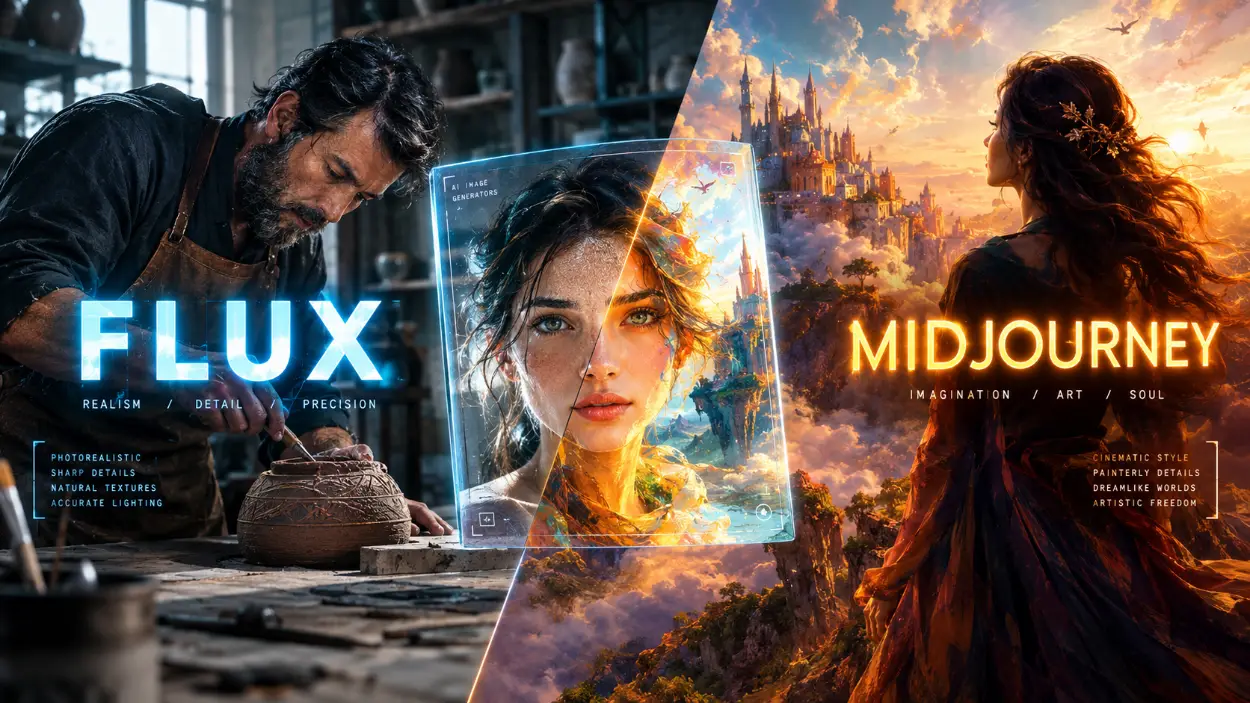
💡 Direct Answer / Executive Summary In the 2026 Flux vs Midjourney showdown, FLUX.1 wins for text rendering, complex multi-object prompt adherence, raw unpolished skin realism, and open-source local fine-tuning through custom LoRAs. Midjourney v6.1 remains superior for instantaneous cinematic aesthetics, effortless artistic styling out of the box, zero-hardware cloud workflows, and creators seeking commercial-ready visuals without navigating technical node setups.
The AI Image Generation Crossroads of 2026
Choosing an image generator used to be simple. For years, Midjourney dominated the landscape. If you needed breathtaking visuals, you opened Discord or the web dashboard, typed a few descriptive phrases, and walked away with a gallery-worthy piece of digital art. Competitors struggled with mangled human hands, melted eyes, and alien text that looked like alien hieroglyphics.
The landscape transformed when former Stability AI researchers founded Black Forest Labs and launched the FLUX.1 family. Powered by a 12-billion parameter rectified flow transformer and deep text comprehension, FLUX solved the fundamental flaws that plagued open diffusion models for years.
Creators in 2026 face an authentic dilemma: Should you continue paying a monthly subscription for Midjourney's polished, closed ecosystem, or migrate your production pipeline to FLUX's flexible, open-weight architecture?
At Promzio, our research team tests thousands of prompts weekly across both engines. We have built production pipelines, stress-tested character consistency across hundreds of scenes, and examined prompt outputs at 400% zoom. This guide breaks down the technical differences, empirical benchmarks, and practical workflows to help you decide which engine deserves your creative energy and budget.
Promzio Lab Testing Methodology
To produce an objective Flux vs Midjourney comparison, our lab established four rigorous testing protocols across identical seed prompts:
Semantic Prompt Adherence: Measuring how faithfully each engine executes multi-clause spatial instructions, negative constraints, and color assignments without prompt bleed.
Typography and Graphic Rendering: Assessing in-image text spelling, font geometry, and integration into environments such as neon signs, apparel, and magazine layouts.
Organic Photorealism and Anatomy: Inspecting skin micro-textures, subsurface scattering, eye wetness, dental structures, and complex five-finger hand interactions with physical objects.
Artistic Cohesion and Cinematic Styling: Evaluating atmospheric lighting, compositional balance, color grading, and creative nuance.
Both platforms were tested at their highest current stable capabilities: Midjourney v6.1 (with both --style raw and standard stylize values) and FLUX.1 [dev] / FLUX.1 [pro] operating with standard CFG and rectified flow scheduling.
Flux vs Midjourney: The 2026 Head-to-Head Comparison Matrix
The table below summarizes the technical specifications, architectural differences, and operational characteristics of both platforms.
| Feature / Metric | FLUX.1 (Dev / Pro / Schnell) | Midjourney (v6 / v6.1) | Winner |
|---|---|---|---|
| Model Architecture | 12B Parameter 100% Rectified Flow Transformer | Proprietary Latent Diffusion + Aesthetic Tuning | FLUX.1 (Technical Scale) |
| Text Encoder | Dual Encoder: CLIP ViT-L/14 + 4.7B T5-XXL | Proprietary Multimodal Language Model | FLUX.1 (Deep Comprehension) |
| In-Image Typography | Flawless multi-word quotes, signs, branding | Improved in v6, but struggles past 2-3 words | FLUX.1 (Clear Victory) |
| Prompt Adherence | Follows long, complex, multi-subject prompts | Strong, but drops tokens beyond 60 words | FLUX.1 |
| Default Visual Bias | Neutral, documentary, raw organic realism | Highly stylized, cinematic, polished, glossy | Midjourney (Artistic / Fast) |
| Skin & Facial Realism | Asymmetrical pores, blemishes, zero plastic sheen | Hyper-smooth, idealized, studio beauty look | FLUX.1 (Photorealism) |
| Hand & Finger Anatomy | 90%+ anatomically correct across test prompts | 82-85% correct; occasional fused joints | FLUX.1 |
| Local Offline Execution | Yes (Open weights via ComfyUI, Forge, WebUI) | No (Strict cloud-only via Web & Discord) | FLUX.1 (Data Privacy) |
| Custom Model Training | Full LoRA training, ControlNet, PuLID support | Closed garden; style references (--sref) only | FLUX.1 (Extensibility) |
| Ease of Use | Moderate to Advanced (Requires GPU or API setup) | Beginner Friendly (Web app and Discord prompt bar) | Midjourney (Accessibility) |
| Pricing Model | Open-source weights (Free local) or Pay-per-API | $10 to $120 / month recurring subscription | Tie (Workflow Dependent) |
Round 1: Prompt Adherence & Complex Spatial Language
The foundational difference in the Flux vs Midjourney debate stems from language parsing.
Midjourney relies on a custom CLIP-based interpreter that excels at identifying descriptive keywords, stylistic adjectives, and atmospheric moods. However, CLIP treats sentences like bags of tokens. When you give Midjourney a complex instruction with multiple objects, colors, and relative positions, it frequently suffers from token bleed—applying the color of a jacket to a car, or moving a foreground object into the background.
FLUX.1 incorporates Google's massive T5-XXL text encoder alongside CLIP. T5 is a full transformer language model trained on deep conversational syntax. It understands subject-verb-object relationships, prepositions ("underneath", "adjacent to", "behind"), and negative implications without needing manual keyword hacking.
Empirical Prompt Test: The Spatial Arrangement Challenge
We tested both engines with a notoriously difficult spatial composition prompt:
A cinematic medium shot inside an artisan Parisian bakery. On the left wooden counter sits a vintage brass mechanical scale balancing three dark chocolate croissants. On the right, a ceramic white vase holds five dried lavender sprigs. In the center, a 45-year-old female baker with flour dust on her apron points toward a fresh loaf of sourdough on an elevated marble cutting board. Warm morning window light streams from the far right, casting long diagonal shadows across the stone floor.The Promzio Lab Observations:
Midjourney v6.1: Produced a gorgeous, mood-lit photograph. However, it placed lavender sprigs on both sides of the counter, blended the brass scale directly into the cutting board, and turned the flour dust on the apron into a vague white texture that resembled embroidered lace. The model prioritized aesthetic composition over compositional accuracy.
FLUX.1 [dev]: Accurately separated the counter elements. The brass scale remained strictly on the left holding precisely three pastries, the lavender stayed anchored in the vase on the right, and the baker pointed directly at the sourdough loaf in the center. The direction of the morning light and corresponding shadows matched the prompt's spatial coordinates.
If your creative projects require strict adherence to client briefs, storyboards, or multi-character scenes, FLUX's linguistic precision eliminates dozens of wasted roll cycles. For deeper strategies on building rock-solid prompts across both platforms, explore our complete guide on how to write AI image prompts that work.
Round 2: In-Image Text Rendering & Typography
Before FLUX arrived, rendering readable typography inside AI images was an exercise in frustration. Creators relied on Photoshop or external graphic design software to composite titles onto banners, product packaging, and storefronts. Midjourney v6 introduced native text rendering using quotation marks, but its capabilities remain brittle when handling sentences or small-scale type.
FLUX revolutionized this domain. Thanks to its rectified flow transformer architecture and T5-XXL comprehension, FLUX can render clean, kerned, stylistic typography directly onto curved surfaces, weathered paper, neon tubing, and fabric embroidery.
Editorial street photo of a vintage green coffee truck parked in Seattle rain. On the side of the truck, the words "ROAST & REASON" are painted in faded gold serif typography. Below it, a chalkboard menu reads "Hot Espresso $3.50" in authentic white handwritten chalk lettering. A neon sign hanging from the window awning glows with the word "OPEN" in electric crimson. Puddle reflections on wet asphalt.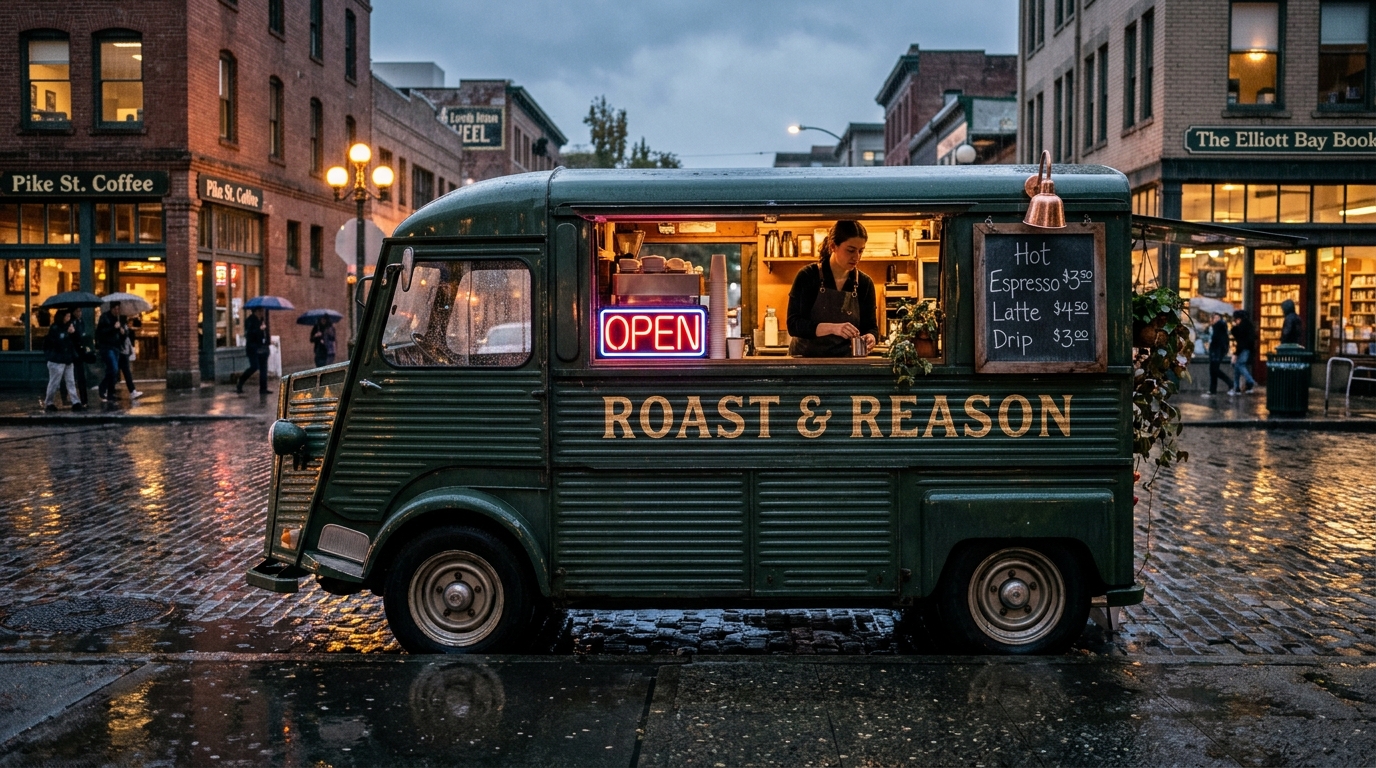
Typography Accuracy Breakdown:
• FLUX.1 [dev]:
  - Main sign: "ROAST & REASON" -> 100% correct spelling, authentic gold serif distressing.
  - Chalkboard: "Hot Espresso $3.50" -> Clear handwritten letters, correctly parsed dollar sign and decimals.
  - Neon sign: "OPEN" -> Flawless luminescence, zero fused characters.

• Midjourney v6.1:
  - Main sign: "ROAST & REASON" -> Spelled correctly on 2 out of 4 variations; letters slightly warped on curves.
  - Chalkboard: Produced illegible cursive scribbles and scrambled digits ("Hot Espreso $35O").
  - Neon sign: "OPEN" rendered cleanly with vibrant glow.
For digital marketers, merchandise creators, poster designers, and branding agencies, FLUX.1 has turned a multi-step design pipeline into a single prompt generation.
Round 3: Photorealism, Human Skin Texture & Anatomy
Photorealism is the most hotly contested arena in the Flux vs Midjourney comparison. Both tools can produce images that fool casual viewers on social media, but they achieve realism through opposite philosophies.
The Midjourney "Cinematic Aesthetic" vs The FLUX "Documentary Rawness"
Midjourney possesses an undeniable built-in aesthetic bias. Even when prompted with minimal descriptors, it infuses images with balanced thirds, dynamic rim lighting, creamy depth of field, and idealized human subjects. However, this aesthetic engine can work against true realism. Faces generated by Midjourney frequently exhibit a subtle "plastic sheen"—hyper-symmetrical cheekbones, perfectly airbrushed pores, and porcelain skin surfaces that feel like a high-fashion magazine advertisement rather than authentic life.
To combat this in Midjourney, you must deliberately strip away its bias by appending --style raw and lowering the stylize parameter (--s 50 or --s 75).
FLUX.1 approaches realism from an unvarnished documentary perspective. It renders:
Natural facial asymmetry (slight variations in eyelid height, smile lines, and jaw balance).
Authentic skin micro-textures (visible sebum, dry patches, acne scars, uneven freckles, and fine facial hair).
Biologically accurate subsurface scattering that reacts correctly to backlighting through ears and nostrils.
Realistic dental anatomy with natural tooth crowding and enamel translucency.
To see real prompt breakdowns of lifelike photography, visit our dedicated realistic photos prompt collection or read our deep-dive tutorial on how to create realistic AI photos.
Anatomy & The Hand Problem
Hand generation has long been the litmus test of generative models. In our benchmark testing:
Midjourney v6.1 successfully renders clean hands in roughly 82% to 85% of standard resting poses. When prompts involve dynamic hand interactions—such as gripping a pencil, tying shoelaces, or holding a cup—it still generates occasional sixth fingers, duplicated joints, or unnatural fingernail angles.
FLUX.1 resolved finger geometry with over 90% accuracy across our stress tests. Because rectified flow transformers maintain spatial coherence across the image canvas during diffusion steps, FLUX understands how fingers wrap around three-dimensional objects without fusing skin surfaces together.
Round 4: Artistic Versatility & Stylized Art
While FLUX dominates technical benchmarks like typography and prompt obedience, Midjourney retains a distinct advantage in raw artistic creativity and stylized illustration.
When you ask an AI engine for "a dreamlike painting of melancholy in the style of 19th-century oil portraiture," you are not looking for literal spatial precision. You want emotional resonance, expressive brushwork, evocative color harmonies, and compositional rhythm.
Midjourney's Creative Intuition
Midjourney remains an artistic instrument without equal. Its training corpus reflects a curated appreciation for art history, photography optics, and graphic design principles. With minimal prompt instructions, Midjourney produces striking compositions that look human-crafted.
Furthermore, Midjourney provides proprietary aesthetic tuning parameters that have no direct native equivalent in standard FLUX interfaces:
--stylize [0-1000]: Controls how aggressively the model applies Midjourney's signature artistic flair.--weird [0-3000]: Injects eccentric, avant-garde visual elements for unconventional conceptual art.--chaos [0-100]: Increases output variety across the initial four-image grid.--sref [URL]: Style Reference extracts color palettes, brush textures, and aesthetic mood from an existing image and applies it to your new prompt.
You can inspect the complete list of parameter flags directly within the official Midjourney documentation.
FLUX in Stylized Art: Literal vs Evocative
FLUX can create stunning illustrations, anime, 3D renders, and digital paintings, but it requires you to be significantly more descriptive. If you do not explicitly prompt the medium, brush technique, lighting style, and palette, FLUX tends to default to a clean, semi-photographic render. It does not "hallucinate beauty" with the same effortless flair as Midjourney.
However, FLUX offers an alternative solution that Midjourney cannot match: open community LoRAs.
Round 5: Customization, Open Ecosystem & Character Consistency
The architectural division between closed and open AI ecosystems is where the Flux vs Midjourney comparison becomes an operational business decision.
Midjourney: The Elegant Walled Garden
Midjourney is a closed, hosted SaaS platform. You cannot download the weights, inspect the code, or run it on private infrastructure.
For character consistency, Midjourney offers the --cref [URL] (Character Reference) parameter. When paired with --cw [0-100] (Character Weight), it allows creators to lock facial structures across multiple prompts with reasonable fidelity. For an exhaustive walkthrough on mastering character locks, read our practical field guide on how to create consistent characters in Midjourney and Flux.
While --cref is convenient, it cannot achieve 100% pixel-perfect identity replication across radically different angles, dramatic lighting shifts, or specific brand mascots.
FLUX: The Open Modular Superpower
Because Black Forest Labs released the model weights on the FLUX.1-dev repository on Hugging Face, the open-source community rapidly built an entire ecosystem around it.
Using node-based execution tools like the ComfyUI open-source repository, developers and creators can:
Train Custom LoRAs (Low-Rank Adaptations): In under 20 minutes on an affordable cloud GPU, you can train a lightweight LoRA model on your face, a specific product line, an architectural material, or a proprietary art style. The resulting file delivers 100% consistent character identity across thousands of variations.
Deploy ControlNet & PuLID: Control exact character poses, depth maps, line art, and facial structures using zero-shot identity preservation nodes without altering the underlying image generation quality.
Execute Inpainting & Outpainting Locally: Mask individual elements with surgical precision, change specific clothing items, or expand canvas ratios with zero credit consumption.
Guaranteed Data Privacy: If your company handles sensitive intellectual property, client assets, or unreleased product designs, FLUX runs entirely offline in an air-gapped environment. No prompts or images are transmitted to external servers.
Round 6: Hardware, Speed, Pricing & Commercial Rights
Understanding the financial and infrastructure footprint of both platforms is essential before committing your workflow.
Midjourney Pricing & Cloud Overhead
Basic Plan ($10/month): ~200 fast generation minutes. No relaxed mode.
Standard Plan ($30/month): 15 fast hours + unlimited slow (relaxed) generation.
Pro Plan ($60/month): 30 fast hours + unlimited relaxed + stealth generation (keeps images hidden from public gallery).
Hardware Requirement: None. Runs on any browser, laptop, or smartphone via Discord or the web dashboard.
Commercial Rights: Images generated on paid plans belong to you, subject to Midjourney's terms of service.
FLUX.1 Deployment Tiers & Costs
FLUX is distributed in three distinct model variants:
FLUX.1 [schnell]: A distilled 4-step model licensed under Apache 2.0. Completely free for personal and commercial use. Generates full-resolution images in 1.5 to 3 seconds on modern GPUs.
FLUX.1 [dev]: A 20-to-50 step guidance-distilled model offering maximum quality and prompt adherence. Free for non-commercial research; commercial licensing is available through official partner platforms.
FLUX.1 [pro]: Closed flagship weights accessible strictly via official API endpoints. Pricing is approximately $0.05 per standard generation, making it competitive for high-throughput enterprise integrations.
Running FLUX Locally: What Hardware Do You Need?
Running the uncompressed 12B parameter FLUX model natively requires 24GB of VRAM (such as an NVIDIA RTX 3090, 4090, or professional workstation card).
However, community quantization breakthroughs—specifically GGUF and bitsandbytes NF4 formats—allow creators to run FLUX.1 [dev] smoothly on consumer graphics cards with only 12GB to 16GB of VRAM (such as an RTX 3060, 4070, or Apple Silicon M-series Mac with 32GB unified memory) with virtually zero perceptible loss in visual fidelity.
Actionable Prompt Engineering Guide: Midjourney vs FLUX
To extract the best performance from each engine, you must adapt your prompt syntax. Feeding a Midjourney-optimized prompt into FLUX—or vice versa—will produce subpar results.
The Midjourney Prompting Formula
Midjourney thrives on concise, comma-separated token clusters, visual descriptors, lens specs, and technical parameter flags. Avoid conversational sentences.
[Subject & Main Action], [Environmental Context & Atmosphere], [Cinematic Lighting Type], [Camera Lens & Film Stock], [Color Palette] --ar 16:9 --style raw --v 6.1 --s 100Candid portrait of an elderly watchmaker working in a dimly lit workshop, holding precision tweezers over an antique pocket watch, golden dust motes in soft window light, moody chiaroscuro, shallow depth of field, 85mm lens, Kodachrome film tones --ar 16:9 --style raw --v 6.1 --s 75The FLUX Prompting Formula
FLUX responds best to natural, flowing, conversational English. Describe the scene as if briefing a professional photographer or cinematographer. Explicitly define spatial relationships and enclose text in quotation marks.
A documentary-style medium close-up photograph of [Subject performing Action]. The scene takes place in [Detailed Environment]. To the left, [Secondary Subject/Object]. Lighting comes from [Direction and Quality], creating [Specific Shadow/Highlight Details]. The subject has [Specific Skin Textures, Blemishes, Expressions]. Shot on a [Camera Body and Lens], capturing sharp natural focus without digital post-processing.A documentary-style medium close-up photograph of an elderly Japanese watchmaker seated at his cluttered wooden workbench in Kyoto. He wears metal-framed spectacles and holds delicate brass tweezers over the exposed gears of an open antique pocket watch. Natural soft morning light illuminates the right side of his weathered face, revealing realistic skin wrinkles, subtle sun spots, and silver stubble along his jawline. In the background, wooden shelves holding glass jars of watch components are softly blurred. Captured on an 85mm f/1.8 lens with authentic optical depth of field.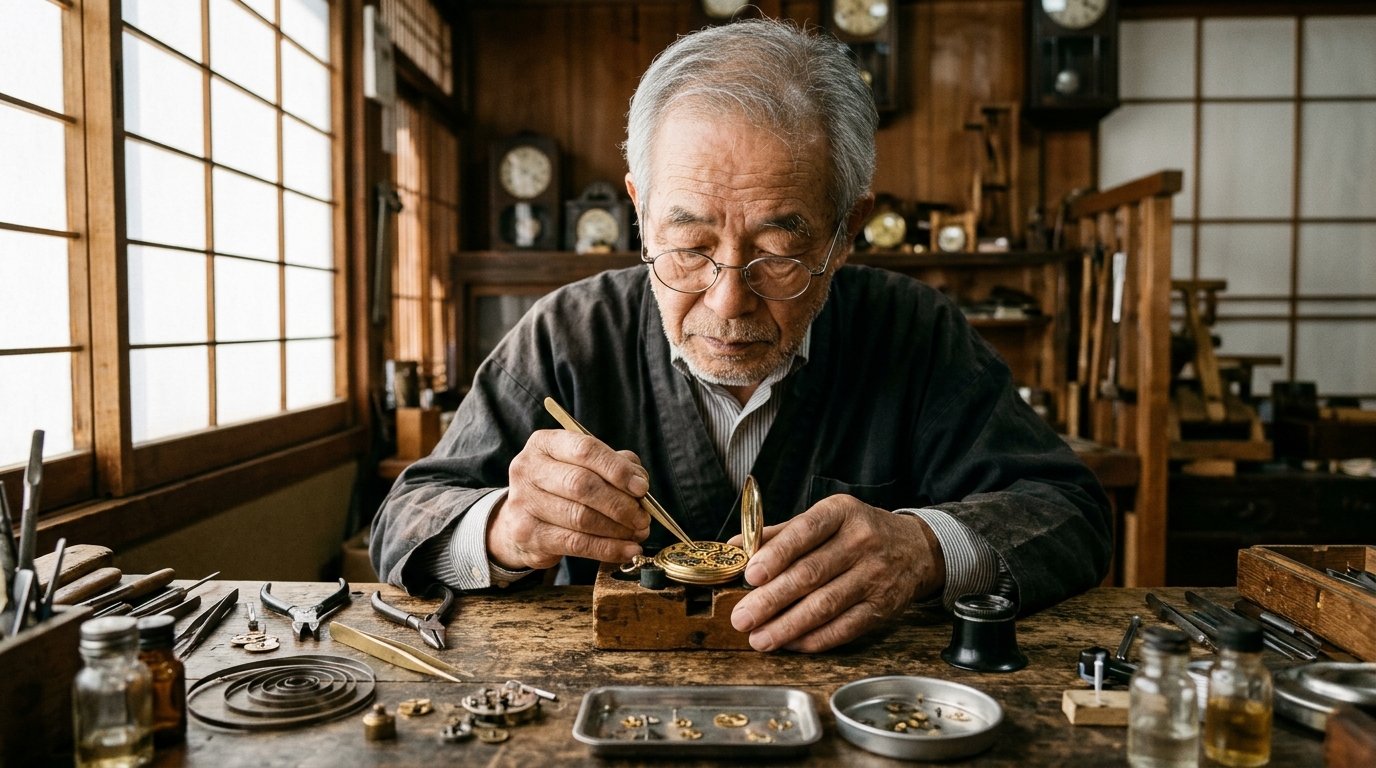
Promzio Workflow Best Practices
💡 Promzio Pro Tip: The Hybrid Production Pipeline The most productive design studios do not lock themselves into a single generator. They utilize a hybrid workflow: 1. Use Midjourney v6.1 for initial ideation, mood boards, stylistic exploration, and atmospheric background landscapes. 2. Transfer winning concepts into FLUX.1 [dev] via ComfyUI whenever the final output demands legible corporate branding, specific packaging typography, complex human hand poses, or custom-trained character LoRAs. This approach captures Midjourney's effortless visual taste while leveraging FLUX's surgical execution.
⚠️ Common Trap to Avoid: Negative Prompt Confusion Do not attempt to use Midjourney-style
--noparameters inside standard FLUX prompts. FLUX does not respond predictably to negative keyword dumping. Instead, use natural language affirmative constraints: instead of writing--no plastic skin, cartoon, writeauthentic raw photograph with natural skin pores and realistic facial imperfections. If running FLUX locally in ComfyUI, be aware that many distilled FLUX workflows bypass the negative conditioning node entirely by design.
Final Verdict: Which AI Image Generator Is Better in 2026?
The question in Flux vs Midjourney cannot be answered with a simplistic winner-takes-all conclusion. Both models have achieved monumental engineering milestones, but they serve different creative requirements.
You Should Choose FLUX.1 If:
You require crisp, legible typography and authentic graphic elements rendered directly on images.
You build production workflows that require custom character, object, or style training via LoRAs.
Your work demands raw, authentic, un-airbrushed human photorealism without stylized gloss.
You handle complex multi-subject prompts with strict spatial positioning and color boundaries.
You prioritize data privacy, offline workflow security, and independence from recurring subscriptions.
You Should Choose Midjourney v6.1 If:
You want immediate, visually stunning cinematic art with minimal prompt engineering effort.
You prefer a cloud-hosted web interface that requires zero local GPU hardware or terminal configurations.
You rely on intuitive built-in features like Style References (
--sref), Pan, Zoom, and Inpainting.Your primary output consists of conceptual landscapes, digital paintings, fantasy art, and high-fashion editorial imagery.
You value rapid ideation where aesthetic beauty matters more than strict compositional obedience.
Both tools represent the cutting edge of visual artificial intelligence in 2026. By matching each engine's architectural strengths to your specific creative goals, you can stop fighting model limitations and start producing your best visual work yet.
To explore thousands of tested, copy-paste prompts optimized for Midjourney, FLUX, and ChatGPT, browse our complete Promzio prompt directory and level up your daily creative workflow.
Frequently Asked Questions
Which is better for photorealistic images: Flux or Midjourney?
Can Flux render text better than Midjourney in 2026?
Is Flux completely free to use compared to Midjourney?
What GPU hardware do I need to run Flux locally?
How do Flux vs Midjourney compare for character consistency?
Does Midjourney have any advantages over Flux in 2026?
Can I use images generated by Flux and Midjourney for commercial projects?

Arjun Mehta
Lead Generative AI Artist & Prompt Architect
Former commercial photographer and 3D visualizer from Mumbai. Specializes in photorealistic portraiture, cinematic lighting setups, and high-fidelity Midjourney & Flux.1 prompt formulations.